
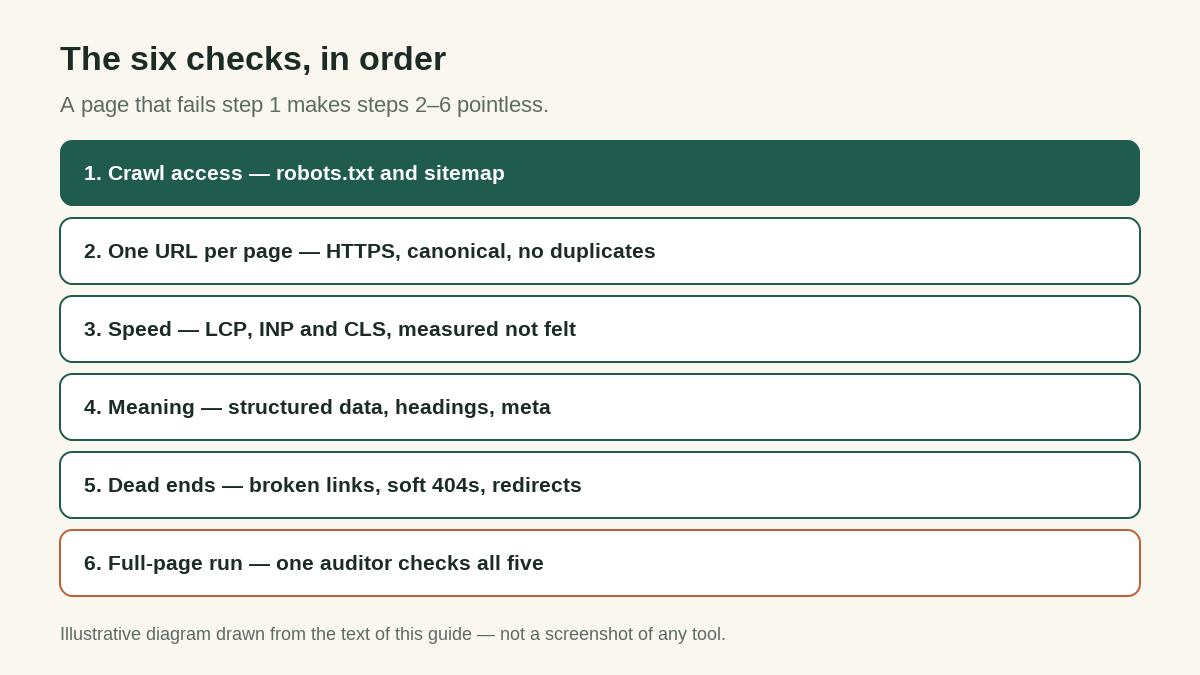
Technical SEO is the work that makes sure search engines can find your pages, read them, and trust them. It is not rankings, and it is not content: it is the plumbing underneath both. A small business site does not need an enterprise audit. It needs six checks, done in order, on every page that matters: crawl access, one URL per page, speed, meaning, dead ends, and a final run through one auditing tool. This post is that checklist, worked on a real small site — this one.

1. What technical SEO is — and what it is not
Technical SEO is everything a search engine needs before it can judge your content. A crawler has to fetch the page, render it, understand what it is about, and decide it is worth indexing. If any of those four steps fails, the page does not rank — not because the content is weak, but because the engine never got a fair look at it.
It is not a ranking promise. Fixing a robots.txt mistake does not move a page to position one; it moves the page from invisible to eligible. It is not content work either: the words on the page belong to the on-page audit, which this site's earlier guide covers in the on-page SEO audit checklist. And it is not a one-off job. Every new page, every redesign, and every platform change can break something that worked yesterday, so the checklist below is a routine, not a project.
Small sites have one advantage here: there are fewer pages to check. A site with 40 pages can run this list by hand in an afternoon. A site with 40,000 pages needs a crawler. This post is written for the first kind — the small business site with a handful of pages that matter and no SEO team.
2. The checklist at a glance
| # | Check | What it answers | How to check it |
|---|---|---|---|
| 1 | Crawl access | Can a crawler reach the page? | robots.txt, XML sitemap |
| 2 | One URL per page | Is there a single address to rank? | HTTPS, canonical tag, duplicates |
| 3 | Speed | Does the page load well enough? | Core Web Vitals: LCP, INP, CLS |
| 4 | Meaning | Can search read what the page is? | Structured data, headings, meta |
| 5 | Dead ends | Does every link arrive somewhere? | Broken links, soft 404s, redirects |
| 6 | Full-page run | Does one tool agree with all five? | 14-tab auditor in VeltrixRank Pro |
Work the list in order. A page that fails check 1 makes checks 2–6 pointless, because the crawler never sees the page at all.
3. Step 1: Can Google reach your pages?
A crawler starts from the pages it already knows and follows links. Two files steer that first step: robots.txt, which states which paths crawlers may fetch, and the XML sitemap, which lists the pages you want indexed. Both are public files at the root of your site — anyone can read them, and so can you.
Open your robots.txt first. It should allow the pages that matter and block only the ones that should never appear in search — admin pages, checkout flows, internal search results. A single wrong line can block the whole site, and the mistake is silent: the pages simply stop appearing. Google's own robots.txt guide explains the syntax; read it before editing the file, because a disallow rule does more than hide a page — it can also stop the crawler from seeing the links on that page.
Then open your sitemap. It should list every page you want indexed and nothing else: no redirects, no 404s, no pages blocked by robots.txt. Our own sitemap lists 121 URLs — every blog post, tool, store page and guide on this site — and it is checked against the live site whenever a page is added, so a new post never sits unlisted. See Google's What Is a Sitemap for what belongs in one and what to leave out.
The worked example is this site's own failure. On 2026-11-11, a new blog post deployed cleanly — its page and its images returned 200 — but the post URL itself returned a 404. The cause was not the page: it was the site's routing function, which carries a hardcoded allowlist of paths, and the new post's route was missing from it. The page existed and the route did not, so the server answered 404. The fix was one line in the allowlist, in both deployment trees, followed by a sweep of every sitemap URL to confirm each one returned 200. The lesson is the checklist's first rule in practice: a page can exist and still be unreachable, and the only way to know is to check the live URL, not the file.
4. Step 2: One URL per page
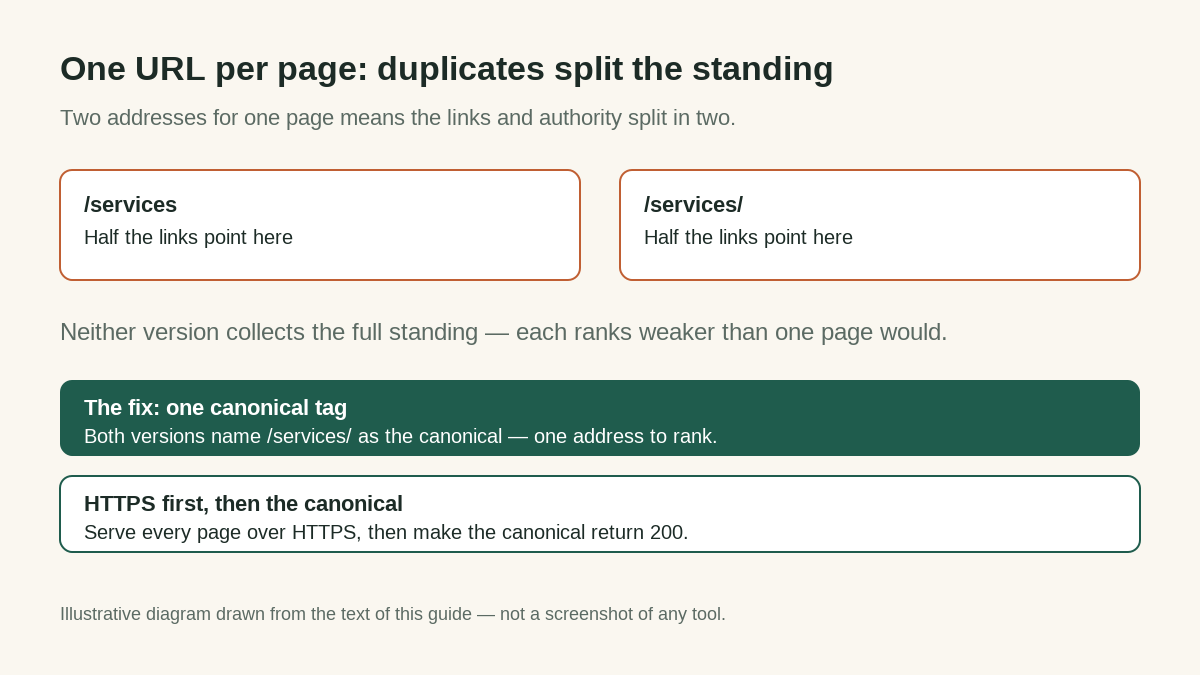
A page that lives at two addresses splits its own standing. The http and https versions, the www and non-www versions, the trailing-slash and no-slash versions — a search engine may treat each as a separate page, and the links and authority split between them instead of collecting on one.
HTTPS comes first. An encrypted connection is the baseline a browser expects, and browsers flag plain HTTP pages as not secure, which costs trust before a reader reads a word. If your site still serves any page over HTTP, fix that before anything else on this list.
Then the canonical tag. When near-duplicates exist — a product page with a tracking parameter, a print view, a paginated archive — the canonical tag names the one URL that should index. It is a strong hint, not a command: Google may choose a different canonical if the pages differ more than the tag claims, so the tag has to match reality. The rule is simple: every page carries one canonical, pointing at itself unless there is a genuine duplicate, and the canonical URL returns 200.
Duplicates are the third part. Two pages covering the same search split the signal between them, and neither ranks as well as one combined page would. The fix is editorial, not technical: pick the stronger page, fold the weaker one into it, and redirect the weaker URL to the stronger one. Our own internal-linking guide covers the same problem from the linking side — the hub-and-spoke model exists precisely so one topic has one hub, not three thin pages.
5. Step 3: Does the page load well enough?
Speed is the check most small sites feel but few measure. Google's page-experience measures are the Core Web Vitals: three numbers, each with a plain meaning.
Largest Contentful Paint (LCP) measures how long the biggest visible element takes to appear — usually the hero image or the main heading. Interaction to Next Paint (INP) measures how long the page takes to respond when a reader clicks or taps. Cumulative Layout Shift (CLS) measures how much the page jumps around while it loads — the button that moves just as a reader taps it.

This site reports its own number honestly: after the speed fixes of 2026-11-10, the home page LCP measured 5.6–6.0 seconds. That is not fast, and this post does not claim otherwise. It is the measured figure, and it is on the fix list — a reminder that a checklist is only useful if its numbers are real. Measure yours the same way, in the same tool, before and after each change, and compare like with like: a lab test and a field measurement are different numbers, and a single good run is not a trend. The Web Vitals guide defines each metric, and our Core Web Vitals insights guide covers how they shape a small site's architecture.
The fixes that usually matter most on a small site are unglamorous: images sized to the space they fill and compressed before upload, no render-blocking script above the fold, and no layout shift from images without dimensions. A hero image at 1200 pixels wide and around 40 KB — the size every image on this blog is compressed to — loads far faster than the same image at full camera resolution.
6. Step 4: Can search read what the page means?
A page can load perfectly and still be misunderstood. Structured data is the label that tells a search engine what the page is: an article, a product, a FAQ, a breadcrumb trail. It is JSON-LD — a block of machine-readable facts in the page head — and it changes nothing the reader sees.
Every post on this blog carries two structured-data blocks: Article, with the headline, author, publisher and publish date, and BreadcrumbList, matching the visible Home > Blog > title trail exactly. The FAQ section carries a third block, FAQPage, whose questions and answers match the visible FAQ word for word. The rule for all three is the same: the structured data must describe the page as it actually is. Marking up a question that does not appear on the page, or a date that is not the real publish date, is not optimisation — it is a false label, and it is the kind of thing that gets a page's rich results removed. The vocabulary behind it lives at Schema.org.
Headings and meta do the same job in plain text. One H1 per page, stating the topic. Headings in order, each one saying what its section does. A title under 60 characters and a meta description under 158, both written for the reader who sees them in the results. None of this is clever. It is the page saying clearly what it is, in every place a search engine looks.
7. Step 5: Are there dead ends?
A link that arrives nowhere wastes the crawl that followed it and the reader who clicked it. On a small site the waste is small in absolute terms, but the fix is cheap, so there is no reason to carry it.
Check three things. First, broken links: links to pages that return 404, inside your own site and in pages you link out to. Second, soft 404s: pages that return HTTP 200 but show no real content — the "not found" message served with a success code, so the crawler treats a missing page as a live one. Our own router lesson from section 3 is the mirror image of this: a live page answering 404. Both directions need the same check — fetch the URL and read the status code, not the file. Third, redirects: a link through a redirect arrives late, and a chain of redirects arrives later still. Link to the final URL, and fix the redirect at its source rather than routing around it.
The cheapest way to run this check on a small site is the sitemap sweep: fetch every URL in the sitemap, record the status code, and investigate anything that is not 200. That sweep is also how the allowlist failure in section 3 was caught and verified fixed — every URL, every time a page is added.
8. Step 6: Run the whole checklist on one page
The five checks above are manual, and manual checks drift. The final step is to run them all through one tool on one real page, and compare the tool's answers with the manual ones. If they disagree, the manual check is usually the one that is wrong — or the tool is measuring something different, and the difference is worth understanding.
The tool this site ships for the job is the 14-tab on-page SEO/AEO auditor in VeltrixRank Pro. Open any page — this post itself is the honest test — and run the auditor tab by tab: title and meta, headings, images, links, canonical, structured data, and the rest. Each tab reports what it found on the live page, not on a copy of it. The auditor is a named Pro feature, with a 3-day free trial and Personal plans from $11/month, and the trial exists precisely so a reader can run this step before paying anything.
The point of the run is not the score. It is the comparison: does the auditor's canonical match the one you wrote, does its heading list match the page you see, does its broken-link tab agree with your sitemap sweep? Where they agree, the checklist is done. Where they disagree, you have found the next fix — and the fix goes on the same list, in the same order, next time.
9. Common mistakes
- Auditing content before access. A perfect title on a page the crawler cannot reach is invisible. Crawl access first, always.
- Blocking pages in robots.txt and expecting them to vanish. A disallow stops crawling, not indexing: a blocked URL can still appear in results, without a description. Use noindex for pages that must not appear.
- One canonical, two realities. A canonical tag pointing at a URL that redirects, 404s, or shows different content is ignored. The canonical must return 200 and match the page.
- Measuring speed once. One fast run proves nothing. Measure before and after, in the same tool, and keep the numbers.
- Structured data that lies. Marking up content that is not on the page is the fastest way to lose rich results.
- Chasing the checklist instead of the page. A site can pass all six checks and still not rank, because the page itself has to deserve the ranking. Technical SEO removes obstacles; it does not write the answer.
- Never re-running the list. A redesign, a platform update, or a single new plugin can undo a check that passed last month. Run the list when anything changes, and once a quarter even when nothing has.
Frequently asked questions
What is technical SEO in simple terms? It is making sure search engines can find your pages, read them, and trust them — crawl access, one URL per page, speed, meaning, and no dead ends. It is the plumbing under content and rankings, not a ranking trick.
How often should a small site run a technical SEO audit? Once a quarter as a routine, and immediately after any redesign, platform change, or new section. A small site can run the six checks in this post by hand in an afternoon.
Do small business sites need an XML sitemap? Yes. A sitemap lists the pages you want indexed, and on a small site it is also the list you sweep for status codes. Keep it to pages that return 200 and are not blocked by robots.txt.
What is a soft 404? A missing page that returns HTTP 200 instead of 404 — usually a "not found" message served with a success code. The crawler treats it as a live page, so it wastes crawl budget and can even appear in results. Fix the status code, not the message.
Can technical SEO alone improve rankings? No. It removes obstacles: a page that was invisible becomes eligible, and a page that was slow becomes readable. The page still has to deserve its ranking with content that answers the search.
Sources
- Google Search Central, "Introduction to robots.txt" — what robots.txt controls and how disallow works. https://developers.google.com/search/docs/crawling-indexing/robots/intro
- Google Search Central, "What Is a Sitemap" — sitemaps as a hint, and what to include. https://developers.google.com/search/docs/crawling-indexing/sitemaps/overview
- Google Search Central, "SEO Starter Guide" — the fundamentals this post follows. https://developers.google.com/search/docs/fundamentals/seo-starter-guide
- web.dev, "Web Vitals" — LCP, INP and CLS, what each measures. https://web.dev/articles/vitals
- Schema.org — the vocabulary behind the structured data in this post. https://schema.org/
- Veltrix Code, internal-linking hub-and-spoke guide — one topic, one hub. https://veltrixcode.com/blog/internal-linking-hub-and-spoke/
- Veltrix Code, on-page SEO audit checklist — the content side of the audit this post's technical checks sit under. https://veltrixcode.com/blog/on-page-seo-audit-checklist/
- Google Search Console Help, "Links report" — the 1,000-row limit on the Links report tables. https://support.google.com/webmasters/answer/9049606?hl=en
Where to start this week
Open your robots.txt and your sitemap, and check that every page you care about is allowed and listed. Then fetch your five most important pages and read their status codes. Those two checks take under an hour, and they catch the failures that make everything else on this list pointless. If the business serves customers in one city, the next list after this one is the local SEO checklist for small business sites — profile, NAP, reviews and local pages. Then run the same five pages through the 14-tab on-page SEO/AEO auditor in VeltrixRank Pro, with the 3-day free trial, and compare what it finds with what you found by hand.