
E-commerce SEO is the work of making an online store’s pages — home, category and product — easy for search engines to find, understand and rank when a buyer searches. It is ordinary SEO applied to a store’s special problems: many similar pages, filters that multiply URLs, and product pages that must answer a buyer, not just describe an item. This guide covers the basics a small store should get right first, in the order to do them, with no invented numbers and no enterprise advice you do not need.
1. What e-commerce SEO is, and how it differs from ordinary SEO
Ordinary SEO helps one page answer one search. E-commerce SEO does the same thing across a catalogue, where the pages resemble each other by design. A clothing store may have fifty product pages with the same layout, the same size chart and nearly the same words. That sameness is normal for shoppers and confusing for search engines, which must decide which page deserves which search.
Three differences matter most. First, scale: even a small store creates hundreds of URLs once filters, sorting and pagination are counted. Second, intent: most store searches are buying searches, so a page that only describes, without price, availability and a clear next step, answers half the question. Third, change: products go out of stock, prices move and pages are removed, so a store must handle disappearing pages cleanly instead of leaving dead ends.
None of this needs special tricks. It needs the basics done in order: structure, URLs, category pages, product pages, images, duplicates, then checking and measuring. That is the order of this guide.

2. Build a structure search engines can follow
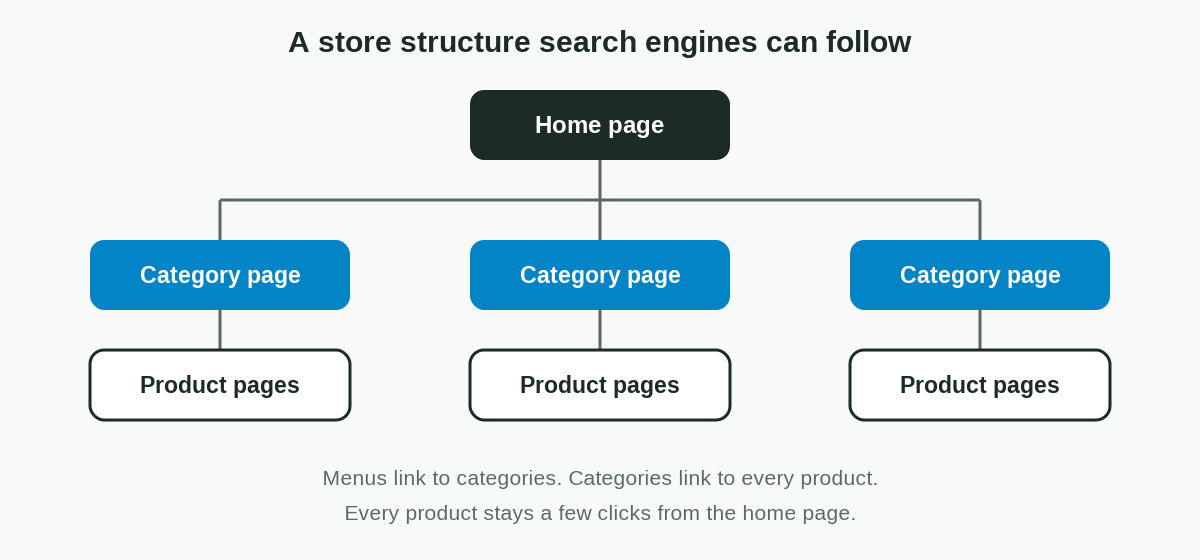
Google finds pages by following links. Its e-commerce guidance describes the chain plainly: menus link to category pages, category pages link to sub-categories, and those link to every product page. A product that is only reachable through your store's own search box may never be found by a crawler at all.
For a small store, three levels are enough: home, category, product. Keep every product within a few clicks of the home page, and link your best-selling categories from the home page itself, because pages with more internal links look more important within your own site. Use ordinary links that a crawler can follow — navigation built only on JavaScript click events may not be followed. Add breadcrumbs on category and product pages so both shoppers and search engines can see where a page sits. Our hub-and-spoke internal linking guide explains the same principle for content sites, and it applies unchanged to a store.
A short checklist for structure:
Every category is linked from the main menu.
Every product is linked from its category page.
No product needs the store search box to be reached.
Breadcrumbs show Home, then category, then product.
An XML sitemap lists the category and product pages you want indexed.
3. Give every page one clear URL
A URL is the address of one page, and a store's most common self-inflicted wound is giving the same page several addresses. Google’s URL guidance for e-commerce sites asks for a short list of things: descriptive words in the path instead of ID numbers, one letter case used consistently, parameters written as key=value pairs, and as few alternative URLs for the same content as possible.
In practice that means preferring an address a person can read — a product path with the product's name in it — over a bare number. It also means not linking internally to temporary parameters such as session IDs or tracking codes, and not using the fragment part of a URL (the part after #) to show different content, because Google does not use fragments in indexing: two fragment variants of one product are the same page to Google.
Pagination needs the same care. Each page of a paginated category needs its own unique URL, and the first page should not be declared the canonical version of the whole sequence. These are small rules, but a store that breaks them makes Google crawl the same content repeatedly and choose a main version by guesswork. Our technical SEO checklist for small sites covers the same ground for non-store pages.
| Weaker URL | Better URL | Why |
|---|---|---|
| /product/3243 | /product/black-leather-chelsea-boots | Words describe the page; a number describes nothing |
| /shoes?black | /shoes?color=black | key=value parameters are readable to crawlers |
| /product/kurta#blue | /product/kurta?color=blue | Fragments are ignored in indexing; parameters are not |
| /Candles and /candles as two pages | /candles only | One case, one address, no split signals |
4. Make category pages answer broad searches
Category pages usually target your broadest searches — the searches of a shopper who knows the kind of thing they want but not the exact item. Treat each category as a landing page, not a bare grid. Give it a title and heading that match how people search, a few sentences above the products explaining what the range is and who it is for, and, where it helps, a short buying guide or questions section below the grid.
One intent per category page is the rule. If two categories chase the same search with near-identical products, merge them or sharpen the difference until each page clearly owns its own search. The same one-URL-per-intent discipline that keeps a blog honest keeps a store's categories from competing with each other.
5. Make product pages worth ranking
A product page answers a specific search, so it must be specific. Four things carry most of the weight.
First, a unique title: the product name, the detail that matters (size, colour, capacity, model), then your store name. No two products should share a title, and the same boilerplate should not repeat across the catalogue.
Second, your own description. Supplier text copied word for word appears on every store selling the same item, so it gives Google no reason to choose yours. Write what the product is, who it is for, its size and materials, how to use or care for it, and what is in the box. Answer the questions a buyer would ask before paying.
Third, honest facts on the page: price, availability, delivery information and returns, visible where the buyer can see them. If you add product structured data so search results can show price and availability, the values in the code must match the values on the page — a mismatch is worse than no markup at all.
Fourth, a clear next step. A product page that ranks but leaves the buyer unsure how to buy has done half its job.

6. Treat product images as content, not decoration
For many store searches, the image is the answer the shopper scans first. Give each image a short descriptive file name in plain words, and alt text that describes what is in the picture — Google calls alt text the most important attribute for describing an image, and it should be written for a person, not stuffed with keywords. Compress images so pages stay fast on a phone; a beautiful product photo that takes ten seconds to load loses the buyer it attracted. Several clear images per product, showing the item from the angles a buyer would turn it in their hands, beat one perfect shot.
7. Keep filters and duplicates under control
Filters are kind to shoppers and dangerous to indexing. Colour, size and price filters, combined freely, can generate a near-infinite number of URLs, most of them near-duplicates. Google names faceted navigation as a common source of over-crawling: the crawler spends its visits on filter combinations instead of your real pages.
The small-store rule is simple: let shoppers filter freely, but let search engines index mainly the unfiltered category and the product pages. Keep one main (canonical) URL per category, keep internal links and your sitemap pointing at that main URL, and do not link your own pages to endless filter combinations. Variants of one product — the same shirt in green and blue — should point back to one main product page unless each variant genuinely deserves its own search.
Out-of-stock and discontinued products need a decision, not neglect. A product that will return should keep its page and say it is out of stock. A product that is gone for good should return a proper not-found response or redirect to the closest replacement — not linger as an empty page that still attracts clicks it cannot satisfy.
8. The worked check: our own page through the on-page checker
Advice is cheap; a check you can repeat is worth more. We run our own store on this site, so the honest demonstration is to run our free on-page SEO checker on real content and read the result the way we would read a product page's.
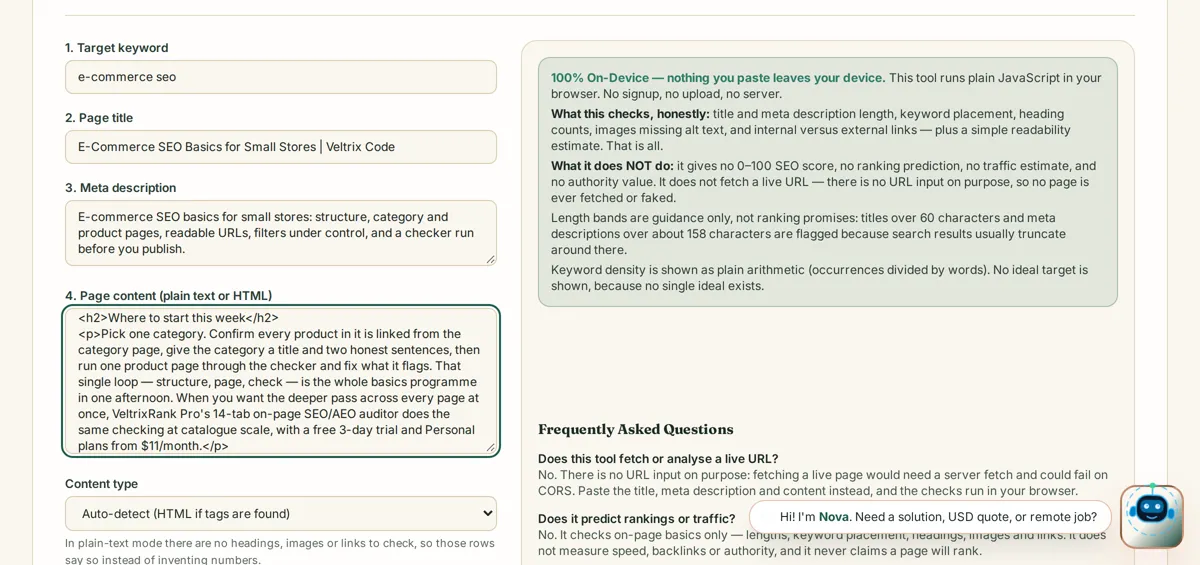
The checker takes four inputs — a target keyword, a title, a meta description and the page content — and reports on title and meta lengths, keyword placement, headings, images and links. It fetches no live URL; you paste the content, which makes it a pre-publish check, exactly where a store needs it: before a product page goes live, not after.
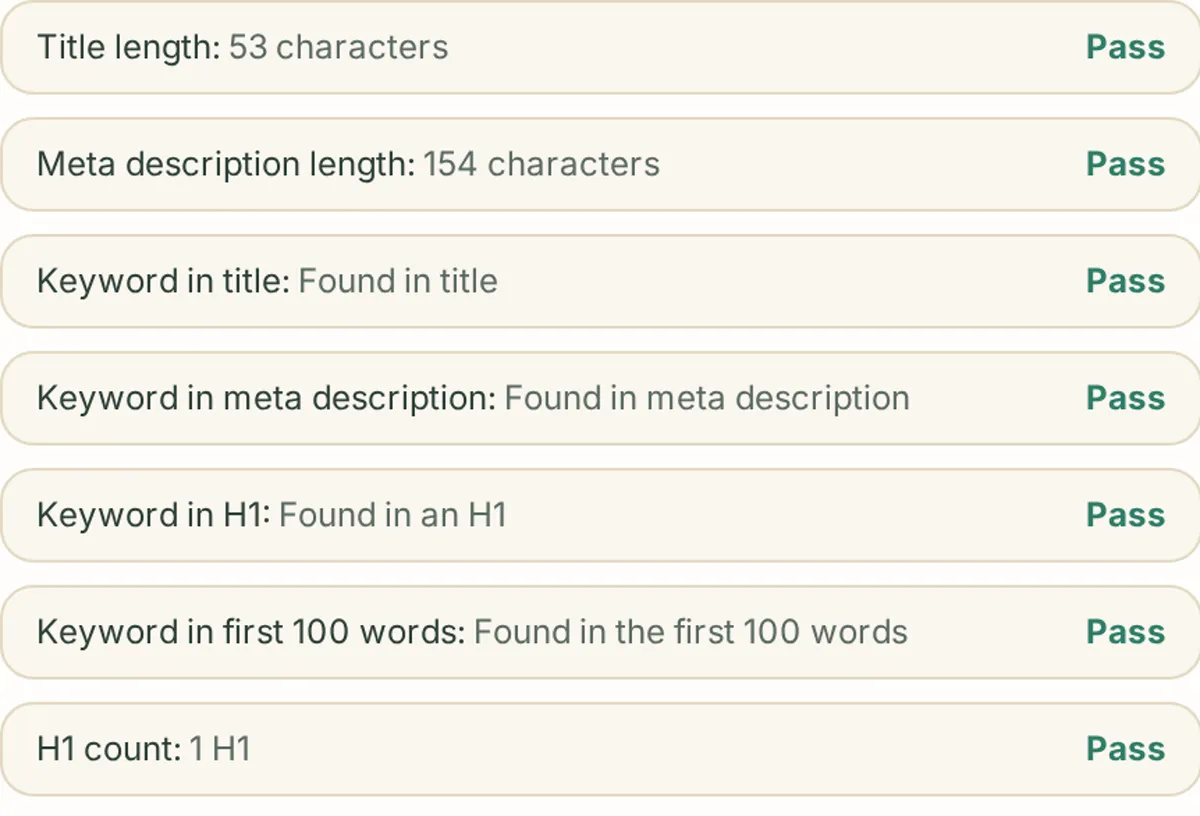
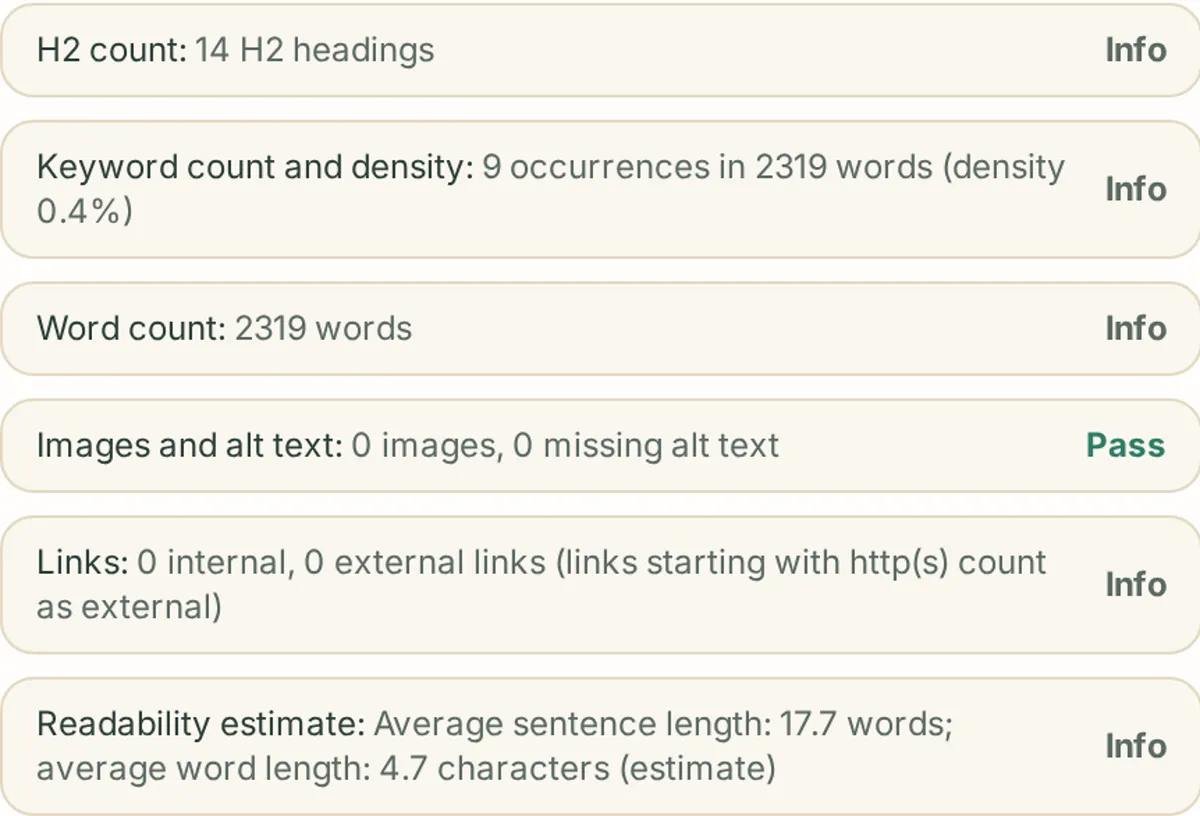
We pasted this guide's own real title, meta description and content, with the target keyword "e-commerce seo", and ran the check.
Read the output the way section 5 teaches: title length within limits, meta description within limits, the keyword present where it should be, one H1, headings in order. Whatever the checker flags is fixed before publishing — that loop, repeated for every product page, is e-commerce SEO in miniature. The fuller version of the same habit is our on-page SEO audit checklist, which walks a whole page in about thirty minutes.
9. Measure like a store owner, not like a gambler
Once pages are live, Search Console is where a store owner reads the truth: which queries brought impressions, which pages earned clicks, and whether a category is being seen at all. Read it weekly, judge monthly, and compare like with like. A product page with impressions but no clicks usually has a title or snippet problem; a page with neither usually has a discovery problem — check that it is linked from its category and listed in the sitemap before rewriting anything. Our guide to reading SEO report metrics explains how to read those four numbers without being fooled by them.
10. What not to do
Do not copy supplier descriptions across the catalogue and expect Google to prefer your copy.
Do not create a new category page for every filter combination.
Do not leave discontinued products as empty live pages.
Do not stuff product titles and alt text with repeated keywords.
Do not judge a store change by one day of numbers; stores move weekly, not hourly.
Frequently asked questions
What is e-commerce SEO in simple words?
E-commerce SEO is making an online store's category and product pages easy for search engines to find, understand and rank for buying searches. It is ordinary SEO — structure, titles, content, links — applied to a catalogue's special problems: many similar pages, filter URLs and products that come and go.
Which should a small store fix first: categories or products?
Structure first, then categories, then products. If Google cannot reach a product page, nothing on that page matters. Once every product is linked from its category, category pages earn the broad searches and product pages earn the specific ones.
Do product pages need unique descriptions?
Yes. A description copied from a supplier appears on every store selling that item, so it gives Google no reason to rank yours. Write your own: what it is, who it is for, size and materials, care, and what is in the box.
What should I do with an out-of-stock product page?
If the product will return, keep the page and mark it out of stock. If it is discontinued for good, return a proper not-found response or redirect to the closest replacement. Do not leave an empty page collecting clicks it cannot satisfy.
How do filters hurt SEO?
Each filter combination can create a new URL, and combinations multiply fast. Search engines then crawl near-duplicate pages instead of your real ones. Let shoppers filter, but keep one main canonical URL per category for indexing.
How often should a small store check its SEO?
Check pages before publishing them, then read Search Console weekly and judge changes monthly. Daily checking measures noise; a store's real movement shows over weeks.
Sources
Google Search Central, designing a URL structure for e-commerce sites (developers.google.com) — URL, parameter and fragment guidance.
Google Search Central, e-commerce site structure guidance — menus to categories to products, internal-link importance.
Our own store and tools on this site: the Veltrix Code store, the free on-page SEO checker, and the worked check in section 8, run 27 November 2026.
Where to start this week
Pick one category. Confirm every product in it is linked from the category page, give the category a title and two honest sentences, then run one product page through the checker and fix what it flags. That single loop — structure, page, check — is the whole basics programme in one afternoon. When you want the deeper pass across every page at once, VeltrixRank Pro’s 14-tab on-page SEO/AEO auditor does the same checking at catalogue scale, with a free 3-day trial and Personal plans from $11/month.