
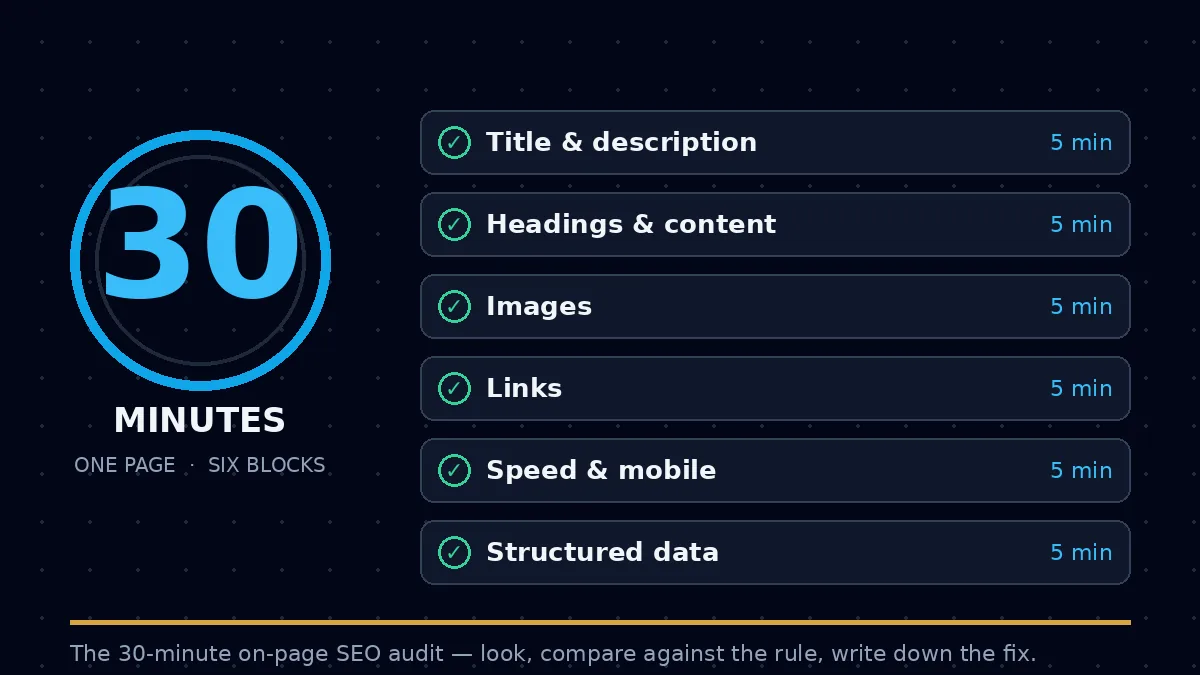
An on-page SEO audit is a check of one page against the things a search engine can actually read on that page: its title, its description, its headings, its words, its images, its links, and the technical signals that say whether the page works on a phone and loads quickly. Thirty minutes is enough for one page done properly. It is not enough for a whole site, and that is the point: an audit that tries to cover everything in half an hour covers nothing. Pick your most important page, work through the six five-minute blocks below, and finish with a short list of fixes in priority order.
1. What an on-page audit is — and what it is not
An on-page audit looks only at the page itself. It does not look at who links to you — that is what the backlink gap analysis in the previous post covers — and it does not look at which keywords your competitors rank for, which is the keyword gap analysis from the post before that. It answers one question: if a search engine reads this page today, what does it find?
The check has two halves. The first half is what a reader sees: the title in the search result, the headings on the page, the words themselves, and whether the page reads clearly. The second half is what a reader never sees but a search engine still reads: the description tag, image alt text, internal links, page speed, mobile behaviour, and structured data. Both halves matter, because a page can read well and still be hard for a search engine to understand, and a page can be technically tidy and still say nothing useful.
An audit is also not a ranking promise. Fixing a title does not move a page to the top of the results on its own. What an audit does is remove the obstacles that stop a good page from being understood and shown. The page's content still has to answer the search better than the pages around it. Anyone who sells an audit with a ranking guarantee attached is selling something the audit cannot deliver.
2. The 30-minute plan
Six blocks of five minutes each. Keep a timer visible, and write every finding down as you go — a finding you do not write down is a finding you will forget before the fixes start.
| Minutes | Block | What you check |
|---|---|---|
| 0–5 | Title and description | One title, under 60 characters, naming the page's subject; one description, under 158 characters, that a reader would actually click |
| 5–10 | Headings and content | One H1, headings in order with no skipped levels, and an opening that answers the search in the first paragraph |
| 10–15 | Images | Every image has a file name and alt text that describe what it shows; no image carries the only copy of a key fact |
| 15–20 | Links | Internal links use descriptive anchors and point to pages that exist; no link says “click here” |
| 20–25 | Speed and mobile | The page loads quickly and reads cleanly on a phone, with no overlapping text or unusable buttons |
| 25–30 | Structured data and the fix list | Schema is present where the page type calls for it, and every finding is written into one prioritised fix list |
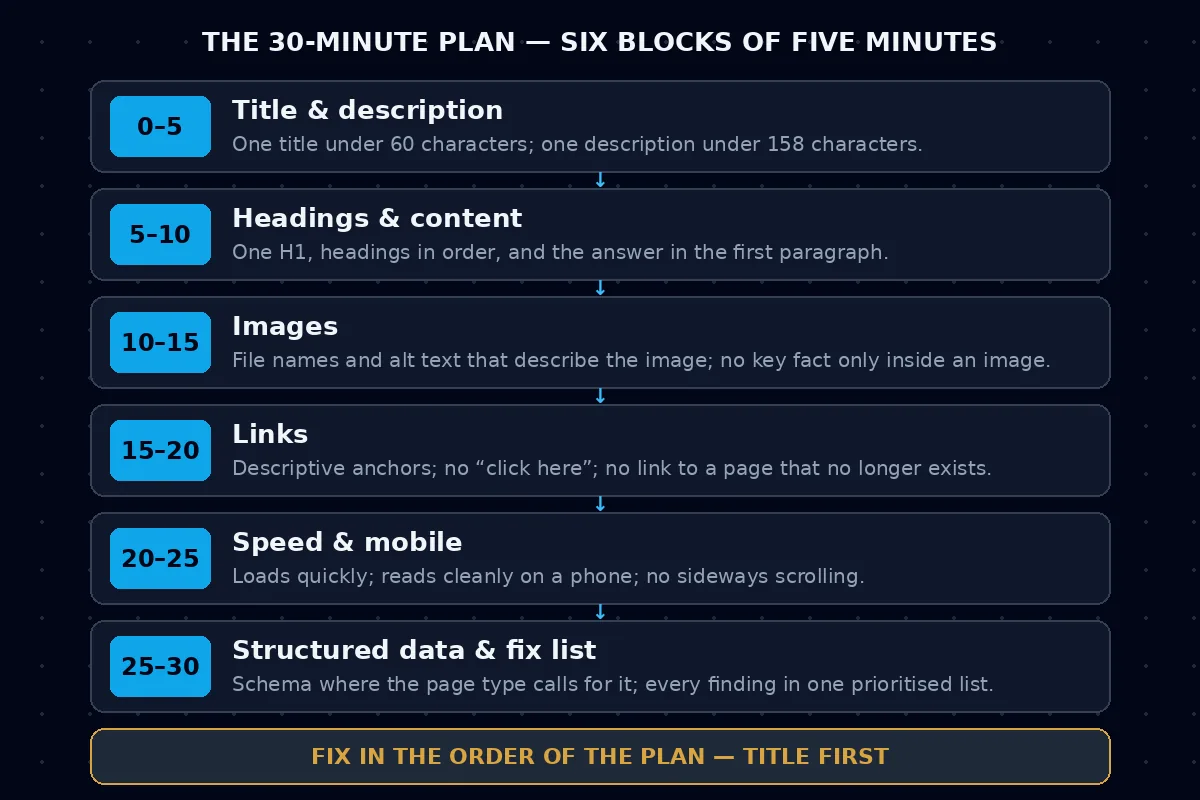
If a block runs over five minutes, move on anyway and note the unfinished item. A finished audit with one open question beats a half-finished audit that never reached the links or the mobile check. The blocks are ordered by impact: the things a search result shows come first, and the things only a machine reads come last.
3. A worked example, step by step
The example below uses a fictional page, labelled as such, so no real site is blamed for these faults. The faults are small on purpose: a real audit finds longer lists, but the operations are identical — look, compare against the rule, write down the fix.
Imagine a fictional bakery, example-bakery.test, and its page example-bakery.test/best-sourdough, which is meant to answer the search for a good sourdough loaf in its town. Here is what the thirty minutes find.
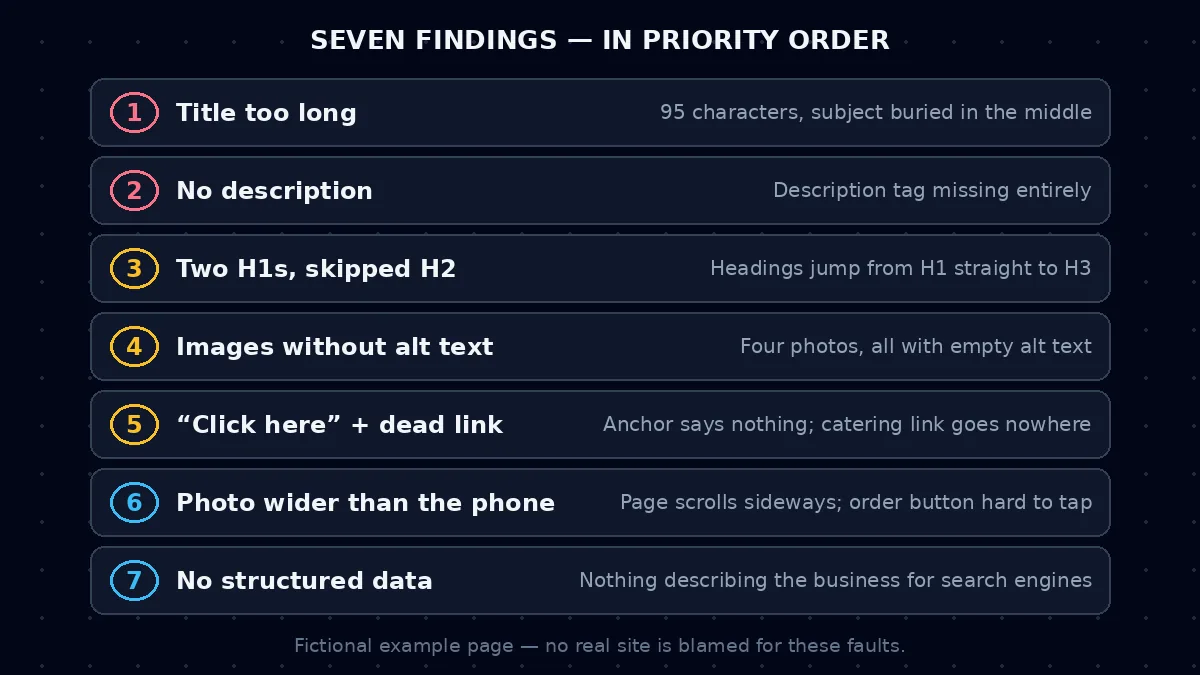
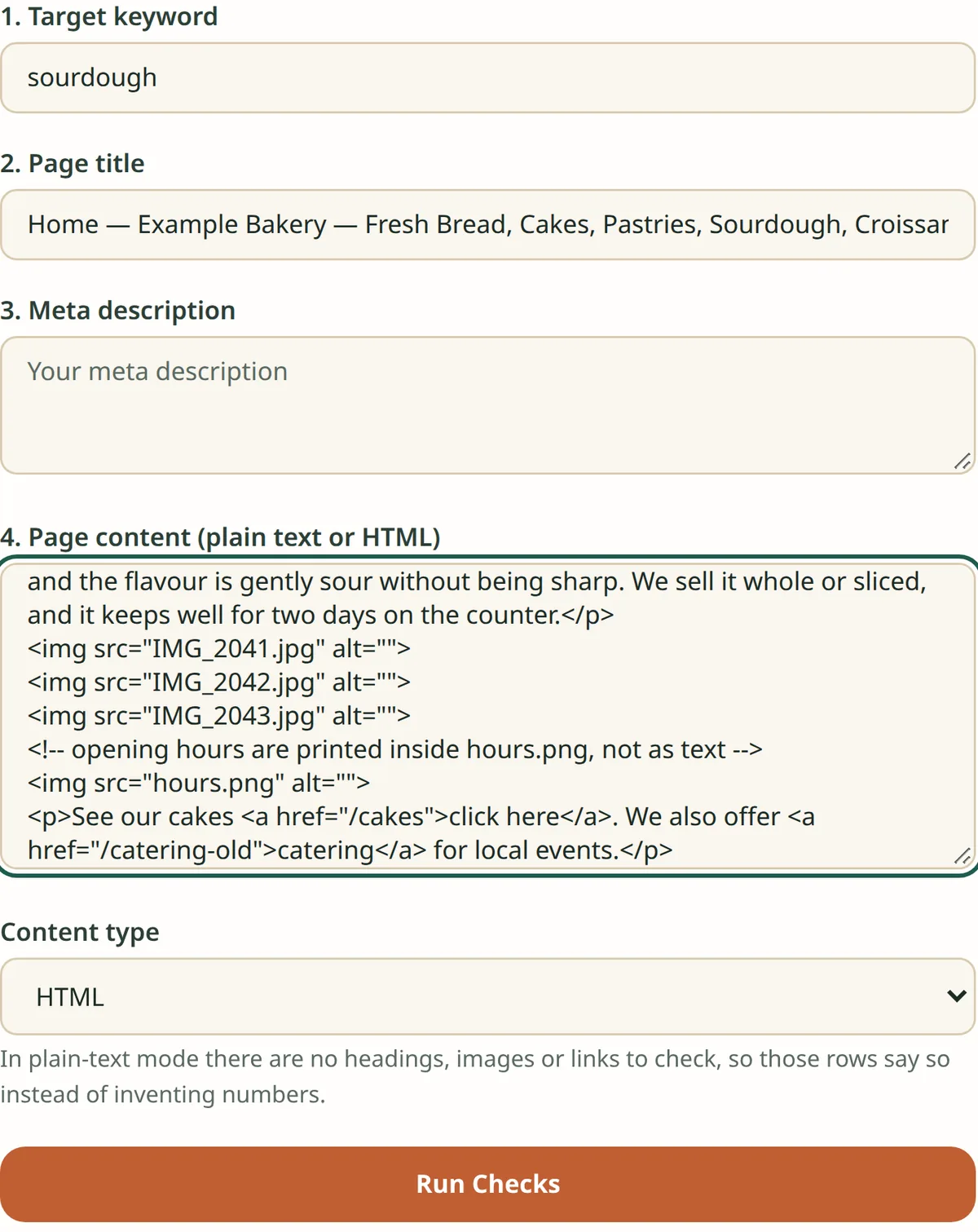
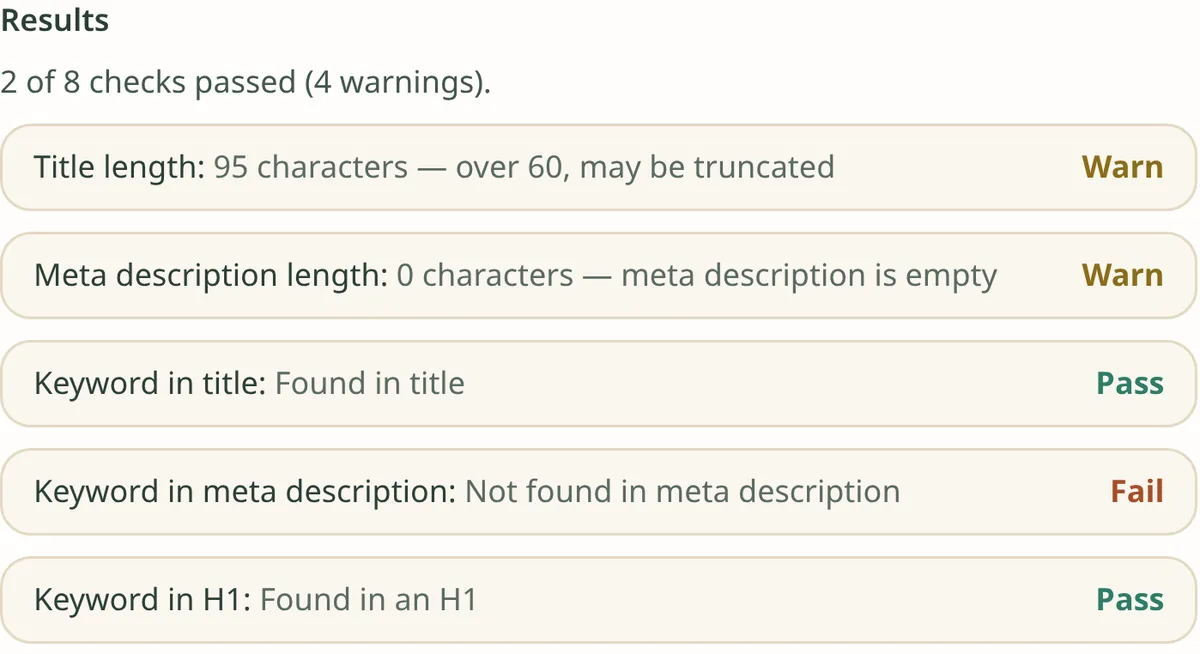
Minutes 0–5, title and description. The page title reads “Home — Example Bakery — Fresh Bread, Cakes, Pastries, Sourdough, Croissants, and More Every Day”. It is far over 60 characters, it says “Home” first, and the subject of the page — sourdough — is buried in the middle. A search result would cut it off before the reader ever sees the word that matters. The description tag is missing entirely, so the search engine writes its own snippet from the page text. Finding one: rewrite the title to name the subject first, in under 60 characters, for example “Best Sourdough in Town — Example Bakery”. Finding two: write one description under 158 characters that says what the page offers and why it is worth opening.
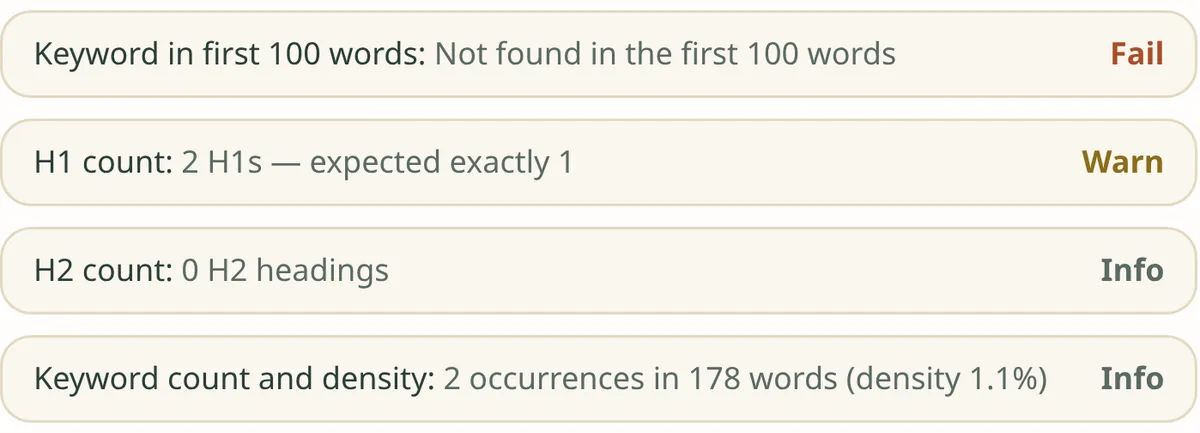
Minutes 5–10, headings and content. The page has two H1 headings — one on the logo area and one on the article — and its headings jump from H1 straight to H3, skipping H2. A search engine uses headings to understand the page's structure, and a skipped level is a broken outline. The first paragraph talks about the bakery's history for two hundred words before mentioning sourdough at all. Finding three: keep one H1, put the headings back in order, and move the answer — what the loaf is, and why it is good — into the first paragraph.
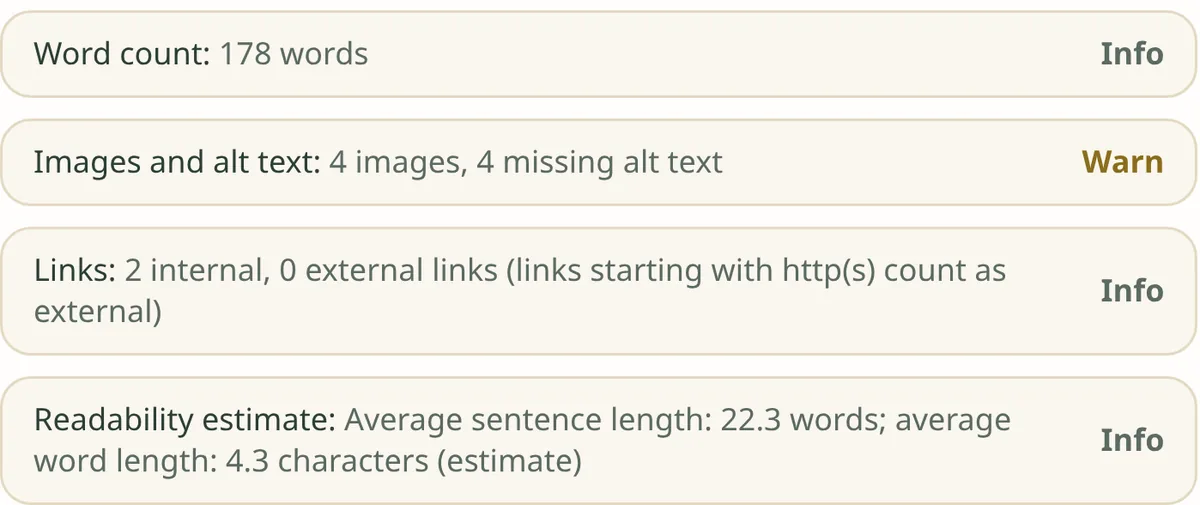
Minutes 10–15, images. The page has four photos. Three are named “IMG_2041.jpg”, “IMG_2042.jpg” and “IMG_2043.jpg”, and all four have empty alt text. The opening hours are printed inside one of the images, so a reader who cannot load images — and a search engine — cannot read them at all. Finding four: rename the files to describe what they show, write full-sentence alt text for each, and move the opening hours into ordinary text on the page.
Minutes 15–20, links. The page links to the bakery's cake page with the anchor text “click here”, and it links to a catering page that no longer exists. A reader learns nothing from “click here”, and a dead link is a dead end for both readers and search engines. Finding five: rewrite the anchor to describe the destination, and either fix or remove the dead link.
Minutes 20–25, speed and mobile. On a phone the loaf photo is wider than the screen, so the page scrolls sideways, and the order button sits so close to another link that it is hard to tap. The page still works, but it is awkward — and most readers of a local bakery page are on a phone. Finding six: resize the image to fit the screen and give the button room to be tapped.
Minutes 25–30, structured data and the fix list. The page has no structured data at all. A local business page of this kind can carry simple structured data describing the business, which helps a search engine understand what the page is. Finding seven: add it, then write all seven findings into one list in priority order — title first, then headings, then images, then links, then mobile, then structured data.
Seven findings, six blocks, thirty minutes. None of them needed a new website. All of them were visible to anyone who looked in the right order.
4. Run it on your own page, step by step
The workflow is the same whatever tool you use, and it follows the order of the worked example:
- Choose one page — the page that matters most for the search you want to win — and open it in a browser the way a reader would, not the way its owner would.
- Check the title first. Count the characters. Does it name the page's subject, and would a stranger understand what the page is from the title alone? If the title is over 60 characters, shorten it from the end, keeping the subject at the front.
- Read the description tag. If it is missing, write one under 158 characters. If it exists, ask whether it would make you click — a description that repeats the title word for word is a wasted line.
- Read the headings as an outline, ignoring the body text. One H1, then H2s, then H3s under them, with no skipped levels. If the outline does not make sense on its own, the page's structure is broken.
- Read the first paragraph. Does it answer the search, or does it make the reader wait? Move the answer up; the background can come later.
- Check every image. Rename files that say nothing, write alt text that describes what the image shows in a full sentence, and move any key fact that lives only inside an image into ordinary text.
- Click every link on the page. Rewrite anchors that say “click here” so they describe the destination, and fix or remove any link that goes nowhere.
- Open the page on a phone. Scroll it, tap its buttons, and check that nothing overlaps and nothing forces sideways scrolling.
- Check the structured data. If the page type calls for it — a business, an article, a product — make sure it is present and matches what the page actually says.
- Write the fix list before you fix anything. One line per finding, in the priority order of section 2, with the page it belongs to. Fix in that order, and re-check the title and headings after the fixes, because a changed title can change what the headings should say.
Two tools on this site can do the checking for you. The free On-Page SEO Content Checker runs in the browser and checks a page's on-page content without uploading anything. The 14-tab on-page SEO/AEO auditor in VeltrixRank Pro runs the same kind of check across fourteen tabs, so each area of the audit has its own view instead of one long report. Either way, the tool finds the faults; the judgement about which fix matters most is still yours, and the fix list in section 2 is the order to use. The three screenshots below are the real results of running the checker on the fictional bakery page above — its summary reads “2 of 8 checks passed (4 warnings)”.
5. What to fix first
Fix in the order of the plan, not in the order you found things. The title comes first because it is the one element every search result shows — a good page with a bad title is a page nobody opens. Headings come second, because they are the page's outline and everything else hangs on them. Images come third, because missing alt text is quick to fix and affects every image on the page at once. Links come fourth, then mobile and speed, then structured data last — not because structured data is unimportant, but because it describes a page that should already be sound.
Do not try to fix everything in one sitting if the list is long. Fix the first three findings, publish, and re-check the page. A page that is re-checked after three fixes teaches you more than a page that waits a month for a perfect overhaul that never happens. And keep the audit itself: date it, file it with the fix list, and repeat it for the same page after a few months. Pages drift — a title gets edited, an image gets swapped, a link goes dead — and a repeated audit catches drift that a single audit never sees.
One more caution, carried over from the domain authority post: an audit measures the page, not the site's standing. A page can pass every on-page check and still rank poorly if nothing links to it and nobody searches for its subject in the words it uses. That is why this post sits after the gap analyses in the series — the audit is the third step, not the first. Check that the page is worth finding, then check that it can be found, then check that it reads well once it is found.
6. Frequently asked questions
How often should I audit a page? Audit a page when it is published, again after any substantial edit, and otherwise every few months. A page that never changes rarely needs a monthly audit; a page that is edited often needs one after each round of edits.
Do I need a paid tool to do an on-page audit? No. The checks in section 4 can all be done by reading the page, counting characters, and clicking links. A tool makes the same checks faster and catches the ones a tired eye misses — the missing description tag, the skipped heading level, the dead link three screens down — but the tool does not replace the judgement about which fix matters most.
Will an on-page audit get my page to the top of the results? No, not on its own. An audit removes the obstacles that stop a good page from being understood and shown. The page still needs content that answers the search, and it still needs the standing that comes from other sites linking to it. Treat the audit as necessary work, not as a ranking promise.
Should I audit one page or my whole site? One page at a time. A whole-site audit is a real job, but it is a different job — it looks for patterns across pages, duplicate titles, and site-wide problems. Start with the page that matters most, finish it, and then move to the next one. A finished audit of one page beats a started audit of fifty.
What about AI search answers — does on-page work still matter? Yes. AI search answers are built from pages, and they favour pages that state their answer clearly, structure it with honest headings, and keep their facts in text rather than inside images. The same checks in this audit — a clear title, an answer-first opening, ordered headings, facts in text — are the checks that make a page easy for an AI answer to use as well.
Try it on your own page
The next step after the audit is the tool that runs it for you. VeltrixRank Pro's 14-tab on-page SEO/AEO auditor checks the page across fourteen tabs, with a 3-day free trial, Personal from $11/month and Agency at $89/year. Run the thirty-minute audit on your most important page first — the fix list it produces is the work that matters, and the title at the top of it is where to start.
Run the thirty-minute audit with VeltrixRank Pro
You can also explore everything else Veltrix Code offers.