
Local SEO is the work that helps a business show up when someone nearby searches for what it sells. This local seo checklist is the whole job, in order: claim the business listing, make the name, address and phone number identical everywhere, earn reviews, put the city in the pages, and keep the basics healthy. It is worked on one example — a fictional bakery, labelled as such below — and every step is something a small business can do by hand, without an agency.

1. What local SEO is — and what it is not
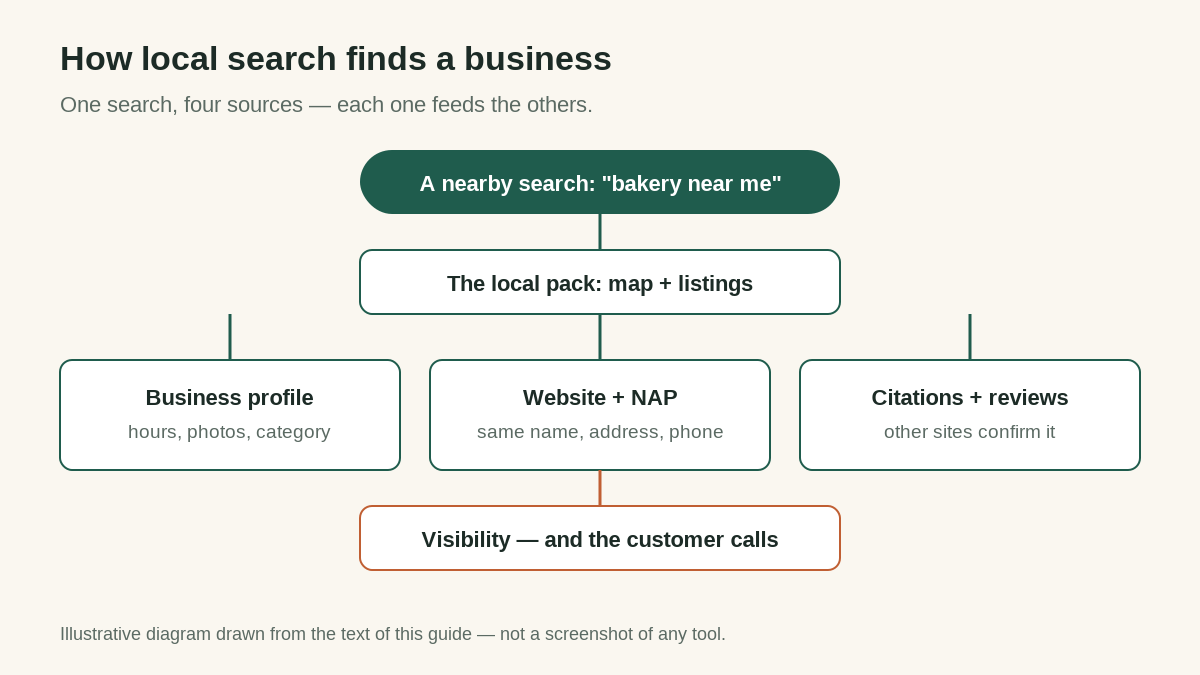
When a search has local intent — "bakery near me", "plumber in Austin", "best coffee in Leeds" — Google shows a different kind of result: a map with a small set of business listings, called the local pack, above or beside the usual web results. Local SEO is the work of getting a business into that set, and onto the first page, for the searches its customers actually type.
It is not a separate internet. The same page still has to be findable, readable and trustworthy — the technical checks in our technical SEO checklist for small business sites all still apply. Local SEO adds one layer on top: proof, in every place search looks, that the business is real, that it is where it says it is, and that customers in that city use it.
It is also not a ranking promise. No checklist step guarantees a place in the map results, and anyone selling a guaranteed position is selling something that does not exist. What the checklist does is remove the reasons a business would be left out: no listing, mismatched details, no reviews, no page that names the city. A business that clears all of those is eligible; the ranking itself is earned by the business, not bought by the checklist.
One honest limit, stated up front: this site's own business is online-only, with no premises and no Google Business Profile of its own. This post teaches the method as a general guide — it does not pretend to report our own local rankings, because we have none to report. The worked example below is a fictional business, labelled fictional, so no real business's details are borrowed or invented.
2. The checklist at a glance
| # | Check | What it answers | How to check it |
|---|---|---|---|
| 1 | Business profile | Does the listing exist and is it complete? | Google Business Profile |
| 2 | NAP consistency | Is the name, address and phone identical everywhere? | Website, profile, directories |
| 3 | Reviews | Do customers rate it, and are replies given? | Profile reviews tab |
| 4 | Local keywords on the page | Does the page name the service and the city? | Title, headings, text; on-page checker |
| 5 | Citations and local links | Do other local sites mention it? | Directories, local press, partners |
| 6 | LocalBusiness markup | Can search read the business as data? | JSON-LD LocalBusiness schema |
| 7 | Basics healthy | Does the site load, work on a phone, use HTTPS? | Technical checklist, six checks |
| 8 | Measure what worked | Did visibility change after the fixes? | Search Console, profile insights |
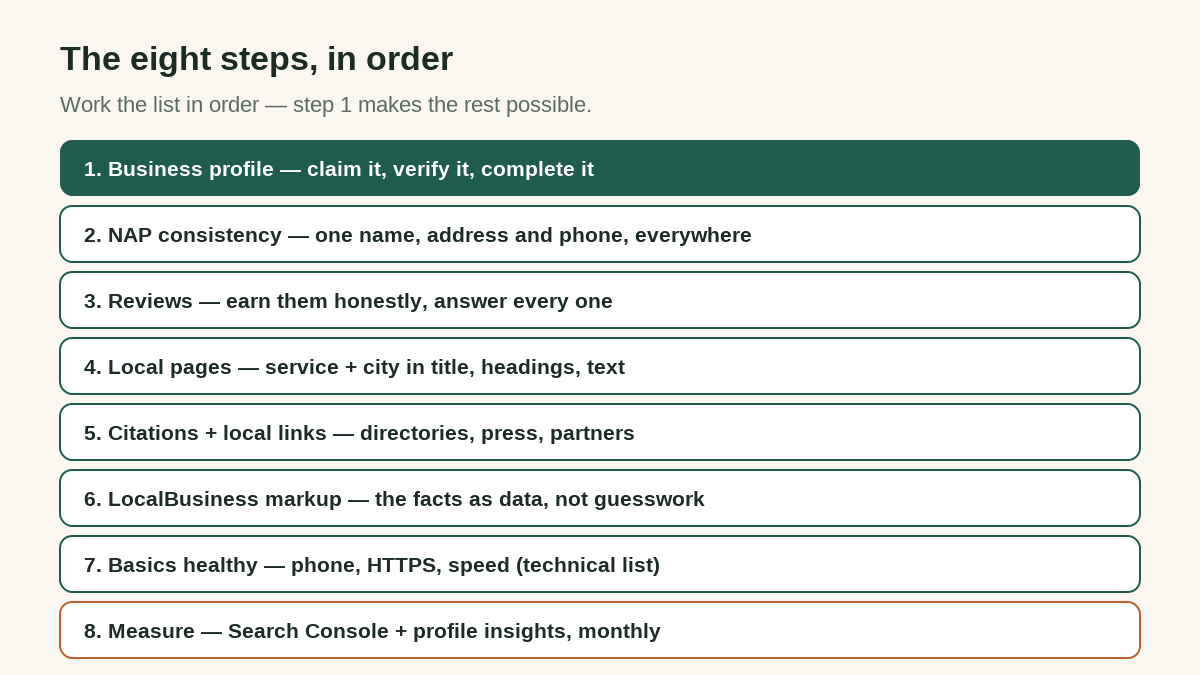
Work the list in order. A page that fails step 1 — no listing at all — makes the later steps weaker, because the map results draw on the listing first.
3. Step 1: Claim and complete the business profile
The Google Business Profile is the free listing that feeds the map results and the local pack. A business claims it, verifies it — Google confirms the business is real, usually by postcard, phone or email — and then fills it in. An unclaimed or half-empty profile is the single most common reason a real business does not appear on the map at all.
Complete means complete: the exact business name as it appears on the shopfront, the full street address, the phone number customers actually call, opening hours that match reality (including holiday hours), the right category and subcategories, a short description in plain words, and real photos of the premises, the team and the work — not stock photos. Every empty field is a question search cannot answer about the business, and every wrong field is an answer that misleads a customer who then turns up at the wrong time.
Keep the profile alive after setup. Hours change, services change, and a profile that still shows last year's hours tells a customer the business does not care. Post updates when something genuinely changes — new hours, a new service, a seasonal offer — and check the profile once a month the way a customer would, from a phone, not from the owner's dashboard.
4. Step 2: Make the name, address and phone identical everywhere
NAP stands for name, address and phone number. The rule is simple and strict: write them exactly the same way in every place the business appears — the website footer and contact page, the Business Profile, every directory listing, every social profile, every mention in the local press. "Maple Street Bakery, 14 Maple Street, Austin, TX 78701, (512) 555-0148" in one place and "Maple St. Bakery, 14 Maple St, Austin, 512-555-0148" in another is not the same listing twice; it is two listings that search has to guess are one business, and the guess is not always right.
Pick one canonical form and write it down. Put it in the website footer so every page carries it. Then work through the listings one by one and fix the variants — suite numbers, abbreviations, old phone numbers from before a move. A business that moved premises and never updated its old listings is still advertising the old address to anyone who finds the old listing first.

The fictional example makes the point concrete. Maple Street Bakery, Austin, Texas, is a fictional business invented for this post; it is not a real bakery, and its address and phone number are made up. If it were real, its footer would read "Maple Street Bakery, 14 Maple Street, Austin, TX 78701, (512) 555-0148" — and its profile, its directory listings and its social pages would read exactly the same, character for character. The example is fictional; the rule is not.
5. Step 3: Earn reviews — and answer them
Reviews are the public evidence that customers use the business, and they are one of the few local signals a business cannot write for itself. The honest way to earn them is to ask: after a sale, a completed job, or a visit, ask the customer to leave a review on the profile, and make the asking easy — a link on the receipt, a card at the counter, a follow-up message. Never pay for reviews, never write them yourself, and never use a review service that fabricates them; fake reviews are against Google's rules, they get removed, and a business caught with them loses the trust the reviews were meant to build.
Answer every review, good and bad, in the business's own voice. A thank-you for a good review costs a minute and shows the next reader that the business notices. A calm, specific reply to a bad review — what happened, what will change — does more for the next reader than the complaint does against it. Silence, especially on bad reviews, reads as indifference, and it is the one response the business fully controls.
Do not chase a perfect score. A business with fifty reviews averaging 4.6 stars reads as real; a business with twelve reviews all at five stars reads as curated. The number that matters is the steady flow: new reviews arriving over months, not a burst in one week and then nothing for a year.
6. Step 4: Put the city in the pages
A page that never names the city cannot rank for a search that does. The service and the city belong in the page title, in a heading, and in the text itself — "plumber in Austin", not just "plumber"; "bakery in Austin, Texas", not just "bakery". The title tag carries the most weight, because it is what the searcher sees in the results, so write it for the searcher first: the service, the city, and one reason to click, in under 60 characters.
One page per place. A business serving three towns needs three pages, each one about its own town — the services offered there, the areas covered, real local detail (the neighbourhoods served, the landmarks nearby, the local events catered). Three thin pages that differ only by the town name are not three pages; they are one page copied twice, and search treats them that way. If there is nothing real to say about a town, there is no page for that town yet.
The worked demonstration runs our own free on-page checker on a real public page: the homepage of Upper Crust Bakery & Cafe, a real bakery in Austin, Texas (uppercrustbakery.com). One thing to know about the tool first: it does not fetch a live URL — there is no URL input on purpose. You paste the target keyword, the page title, the meta description and the page content, and the checks run in your browser. So the run below used the target keyword "bakery in Austin", the real homepage title "Freshly Baked Desserts Daily - Uppercrust Bakery & Cafe", and the homepage's real visible content pasted as HTML. The meta description was left blank because none was verifiable from the visible page — so the tool's empty-meta warning below is a finding about the input supplied, not proof the site has no meta tag in its head. The screenshots are the tool's real output on that input, not a mock-up.
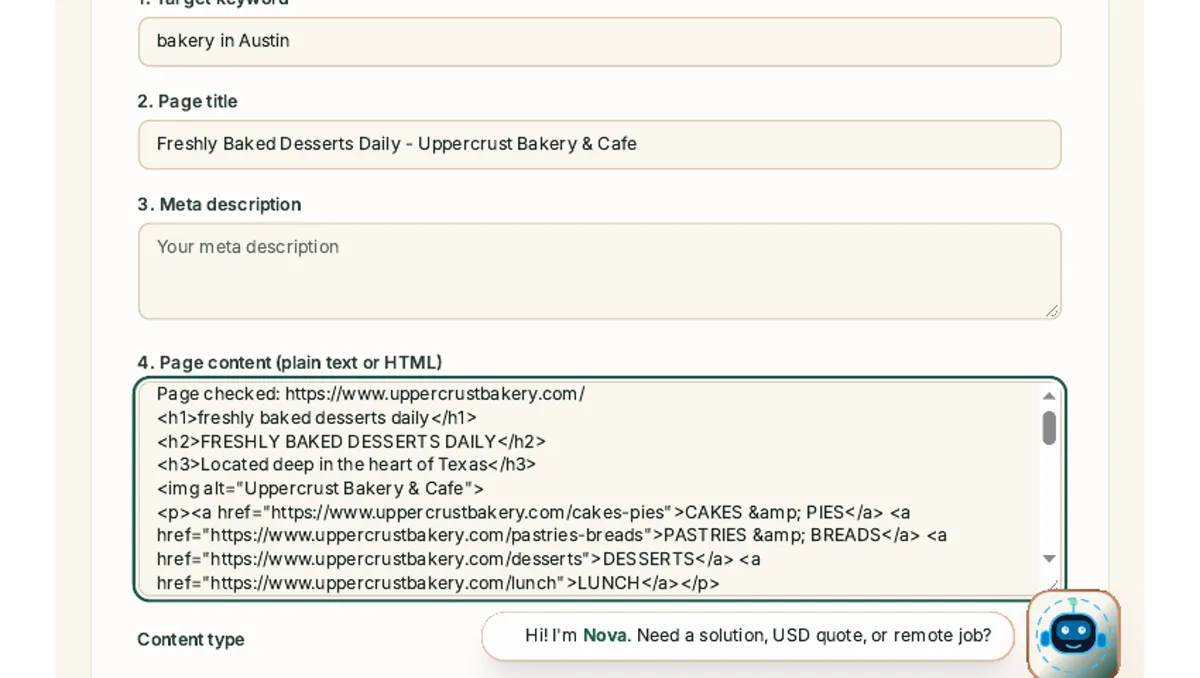
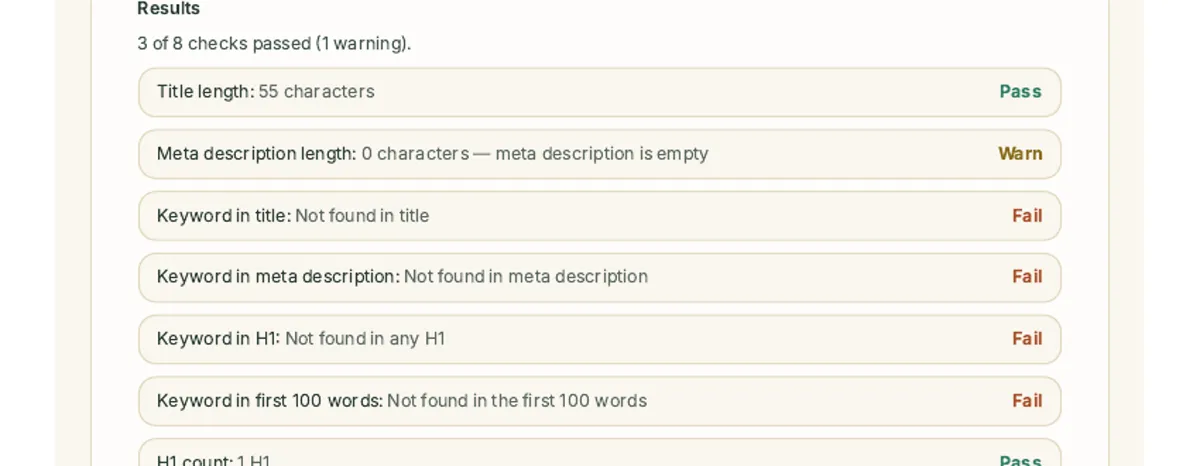
First, the title and meta findings. The result was 3 of 8 checks passed, with one warning — and the failures are exactly the gap this step teaches. The title is 55 characters, a pass on length, but the keyword "bakery in Austin" appears nowhere in it: the title says "Freshly Baked Desserts Daily" and names neither the service keyword nor the city. The same for the meta description, the H1 and the first 100 words — "Not found" in all four. A homepage that never says "bakery in Austin" anywhere search looks cannot rank for "bakery in Austin", however good the baking is.
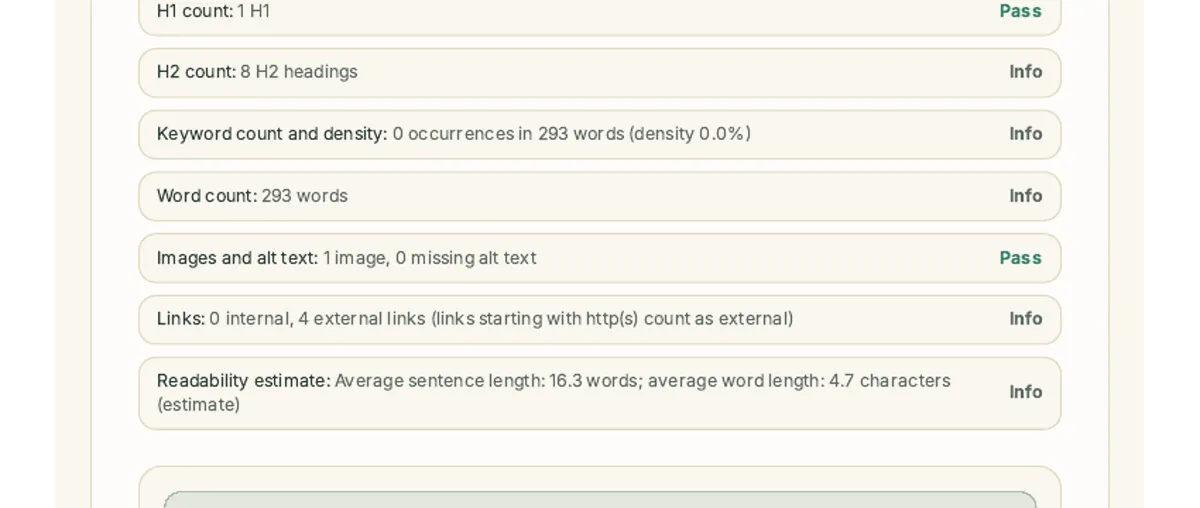
Then the headings: one H1, which passes, and eight H2 headings. The keyword count is 0 occurrences in 293 words — a density of 0.0%. Two rows need a careful reading, not a headline: the images row (1 image, 0 missing alt text) and the links row (0 internal, 4 external) reflect only the HTML that was pasted in, not a crawl of the whole homepage, so they are not evidence about the real site's images or links. The heading, title and keyword rows, though, reflect the real visible homepage content — and they show a real local business whose homepage does not name its city or its service keyword where search looks.
Run the same check on your own pages. The on-page SEO checker is free, runs in the browser with no upload, and reports what it found on the live page — title, meta, headings, images and links. Compare its answers with what you intended the page to say; where they disagree, the page is the thing to fix, not the tool. Our earlier guide, how to do an on-page SEO audit in 30 minutes, covers the full content side of the same check.
7. Step 5: Build citations and local links
A citation is the business listed somewhere other than its own website — a local directory, a chamber of commerce listing, a "best of" round-up, a supplier's stockist page — with the same NAP as everywhere else. Citations are not links for their own sake; each one is an independent confirmation that the business exists at that address with that number. Start with the directories that matter in the business's country and trade, then the local ones: the town's business directory, the local newspaper's business pages, the trade association's member list.
Local links work the same way and are harder to earn, which is why they count. Sponsor the youth team and get listed on the club site. Give the local paper a genuine story — a new opening, a milestone, a community effort — and get mentioned. Supply a local venue and get listed on its suppliers page. None of these is bought, and none is fast; all of them are real, which is the point. A bought directory link and a real community mention are not the same thing, and the difference shows in the listing that carries them.
Keep a list. One page — a spreadsheet is enough — with every listing, its URL, and the date it was last checked. Listings rot: directories change owners, pages move, phone numbers change. A citation with the old address is worse than no citation, because it confirms the wrong facts.
8. Step 6: Mark up the business so search can read it
Structured data is a label in the page that tells search what the business is, in machine-readable form: JSON-LD, using the LocalBusiness vocabulary, naming the business type (Bakery, Plumber, HairSalon), the address, the phone number, the opening hours, and the same name used everywhere else. It changes nothing the reader sees, and it is not a ranking trick — it is the page stating its facts clearly, in the one place a machine can read them without guessing.
Write it by hand for a small site; the block is short, and a hand-written block you understand beats a plugin's block you have never read. Check it in Google's Rich Results Test before publishing, and keep it in sync with the visible page: markup that claims hours the page contradicts, or an address the footer does not carry, is a false label, and false labels get ignored or penalised. The vocabulary lives at Schema.org's LocalBusiness type.
9. Step 7: Keep the basics healthy
None of the local work matters if the site itself fails the basics. The page must load on a phone — most "near me" searches happen on one — over HTTPS, without the layout jumping as it loads. The six checks in our technical SEO checklist cover them: crawl access, one URL per page, speed, meaning, dead ends, and a final tool run. This post does not repeat that list; it assumes it, and a business that has not run it should run it before spending another hour on local work.
The phone test is the one that matters most for local. Open the homepage on a real phone, on a mobile connection, and try to do the thing a customer does: find the address, tap the number to call, check the hours. If any of those takes more than a few seconds to find, the page is losing the customers local SEO is trying to bring. The Core Web Vitals insights guide explains how page experience shapes what search sees.
10. Step 8: Check what worked
Local SEO is slow — weeks, not days — and the only way to know it worked is to measure before and after. Google Search Console is free, and it shows which queries bring clicks and which pages are indexed; note the numbers before the fixes, then check again a month later, in the same tool, and compare like with like. The Business Profile itself reports how many people found the listing, called the number, or asked for directions — the numbers that matter to a local business, because they are actions, not impressions.
Keep the measurement honest. A rise in map views after a listing is completed is expected; it is not proof the business outranks anyone. A rise in calls and direction requests, over months, is the signal that counts. And if a step changed nothing after two months, say so and move on — the checklist is a routine to re-run each quarter, not a set of promises. If your numbers move while a Google core update is rolling out, read the November 2026 core update small business guide first — a rollout changes what the numbers mean, and the guide shows how to tell a real drop from a reporting trap.
11. Common mistakes
- Two names for one business. A trading name on the shopfront, a legal name on the profile, and a shortened name on the website split one business into three. Pick one name and use it everywhere.
- Keyword-stuffing the business name. Adding "best plumber Austin cheap" to the profile name breaks Google's rules and gets the listing edited or suspended. The name is the name.
- One page for every town. Twenty near-identical town pages with only the name changed are not local content; they are duplicates. One real page per town, or no page.
- Buying reviews or citations. Paid reviews get removed and paid directory links are ignored or penalised. Both cost money to make the business look worse.
- Ignoring bad reviews. An unanswered complaint is the review every later reader remembers. Reply calmly, fix what can be fixed, and say so.
- Forgetting the phone test. A site that works on a desktop and fails on a phone loses the exact customers local SEO brings — people standing somewhere, searching now.
- Measuring once. One good week proves nothing. Measure before and after, in the same tools, and keep the numbers.
Frequently asked questions
What is local SEO in simple terms? It is the work that helps a business show up when someone nearby searches for what it sells — the map results, the local pack, and the first page for searches with a place in them. The checklist in this post is the whole job: profile, NAP, reviews, local pages, citations, markup, basics, measurement.
Does a business need a Google Business Profile to appear in local search? In practice, yes for the map results: the local pack draws on the profile, and a business without one is usually invisible there. The profile is free, and claiming and completing it is step 1 of this checklist.
What is NAP in local SEO? Name, address and phone number — written identically in every place the business appears: website, profile, directories and social pages. Mismatches split one business into several listings that search has to guess are the same.
How long does local SEO take to work? Weeks to months, not days. Completing a profile can show in map results quickly; reviews, citations and local pages build over months. Measure in Search Console and the profile's own insights before and after, and compare after at least a month.
Can local SEO alone bring customers? It can bring the visibility — the listing, the map pin, the first-page result. Whether the searcher calls depends on what they see next: the reviews, the photos, the hours, and a website that works on their phone. Local SEO opens the door; the business still has to be worth walking into.
Sources
- Google Business Profile Help — claiming, verifying and managing a Business Profile. https://support.google.com/business/
- Google Search Central, "SEO Starter Guide" — the fundamentals this post follows. https://developers.google.com/search/docs/fundamentals/seo-starter-guide
- Schema.org, "LocalBusiness" — the vocabulary for marking up a local business. https://schema.org/LocalBusiness
- Veltrix Code, technical SEO checklist for small business sites — the six checks this post's step 7 assumes. https://veltrixcode.com/blog/technical-seo-checklist-small-sites/
- Veltrix Code, on-page SEO audit checklist — the content side of the on-page check in step 4. https://veltrixcode.com/blog/on-page-seo-audit-checklist/
- Veltrix Code, internal linking hub-and-spoke guide — one topic, one hub, links both ways. https://veltrixcode.com/blog/internal-linking-hub-and-spoke/
Where to start this week
Claim the profile and check the NAP — those two steps take an afternoon and they are the ones that make everything else work. Then run your homepage through the 14-tab on-page SEO/AEO auditor in VeltrixRank Pro, with the 3-day free trial, and compare what it finds with the checklist above: title, headings, images, links, canonical and structured data, on the live page. Personal plans start at $11/month, Agency at $89/year — and the trial exists so you can run this step before paying anything.