
Your best post sits on page four, and nothing points to it. No page links to it, so a crawler has no path to reach it. Every day it sits unlinked it earns nothing: no readers, no authority, no citation. This guide fixes that with the hub-and-spoke model — one hub page per topic, spoke pages under it, links both ways — built on this site's own pages.
1. What internal linking is — and what it is not
An internal link is a link from one page on your site to another page on the same site. It is the simplest tool in SEO, and it is also the one most sites use least deliberately. Menu links, footer links, and links inside paragraphs all count — but they do not do the same work, and section 7 explains the difference.
An internal link does four jobs. First, discovery: it gives crawlers a path to pages they have not found yet, so a new post gets found through an older post. Second, equity: it passes some of the linking page's standing to the page it points to, so a strong page can lift a weaker one.
Third, relevance: the anchor and the words around it tell a search engine what the destination is about. Fourth, readers: it gives a reader the next step — the guide, the tool, or the product that solves the problem.
The equity job has a real mechanism behind it: Google's Reasonable Surfer patent (US 7,716,225) says a link's weight depends on how likely a reader is to follow it, so a link in the main text carries more weight than one buried in a footer. That is why section 7 ranks in-content links first. Read the patent itself at Google's Reasonable Surfer patent, US 7,716,225.
What it is not matters as much as what it is. It is not a ranking promise: links remove obstacles, but the page still has to deserve its ranking. It is not navigation alone: a menu tells a reader where things are, but a contextual link tells a search engine how pages relate.
And it is not a sitemap substitute: Google treats a sitemap as a hint, not a directive — a page listed in a sitemap and linked from nowhere is still hard to find. See What Is a Sitemap. Google's SEO Starter Guide covers the same basics this post follows.
2. What hub and spoke actually means
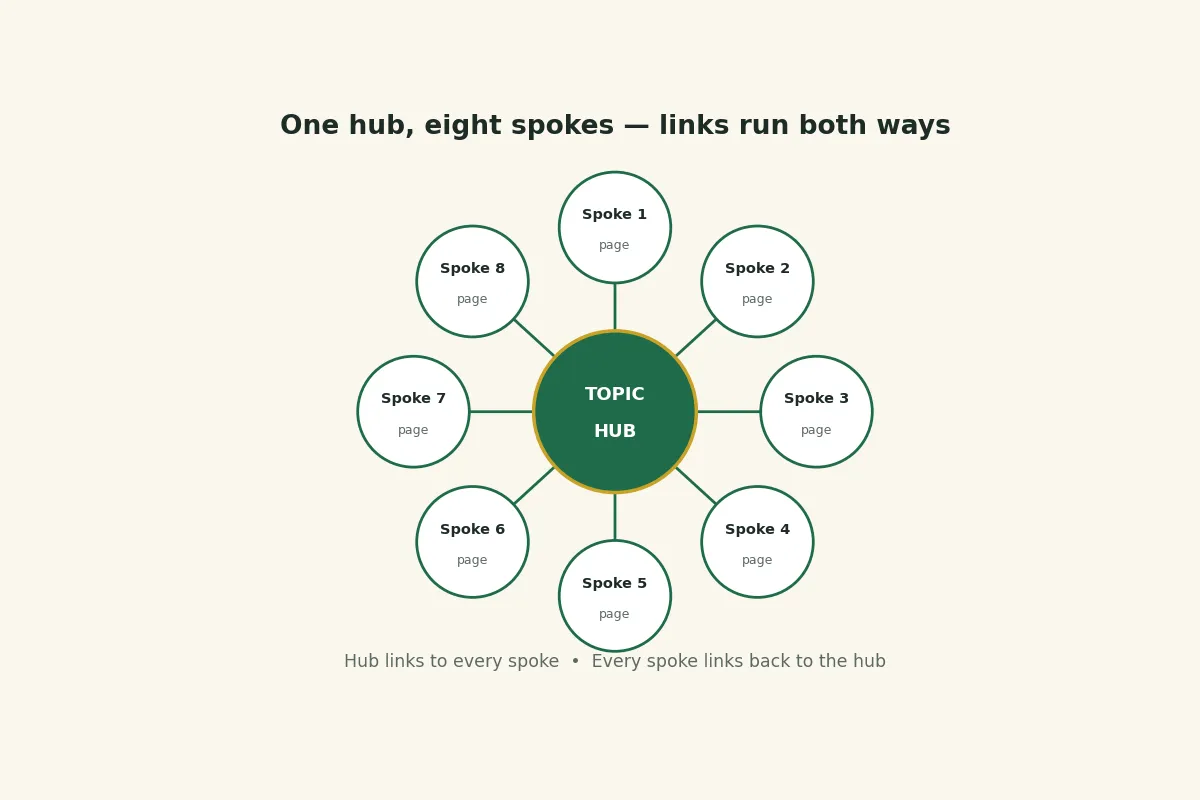
A hub is a broad page that covers a whole topic, and a spoke is a deep page that covers one subtopic inside it. The hub links to every spoke, and each spoke links back to the hub. Think of it as a wheel: the hub is the centre, the spokes are the arms, and the links hold the wheel together.
Three linking rules make the model work. First, spokes link up: every spoke links back to its hub, near the top or in the first relevant paragraph, so the hub collects the standing. Second, the hub links down: it links to all of its spokes, each with a one-line description, so a reader and a crawler see the whole topic from one page. Third, spokes link sideways: each spoke links to its closest siblings, so the cluster reads as one connected topic, not as separate pages.
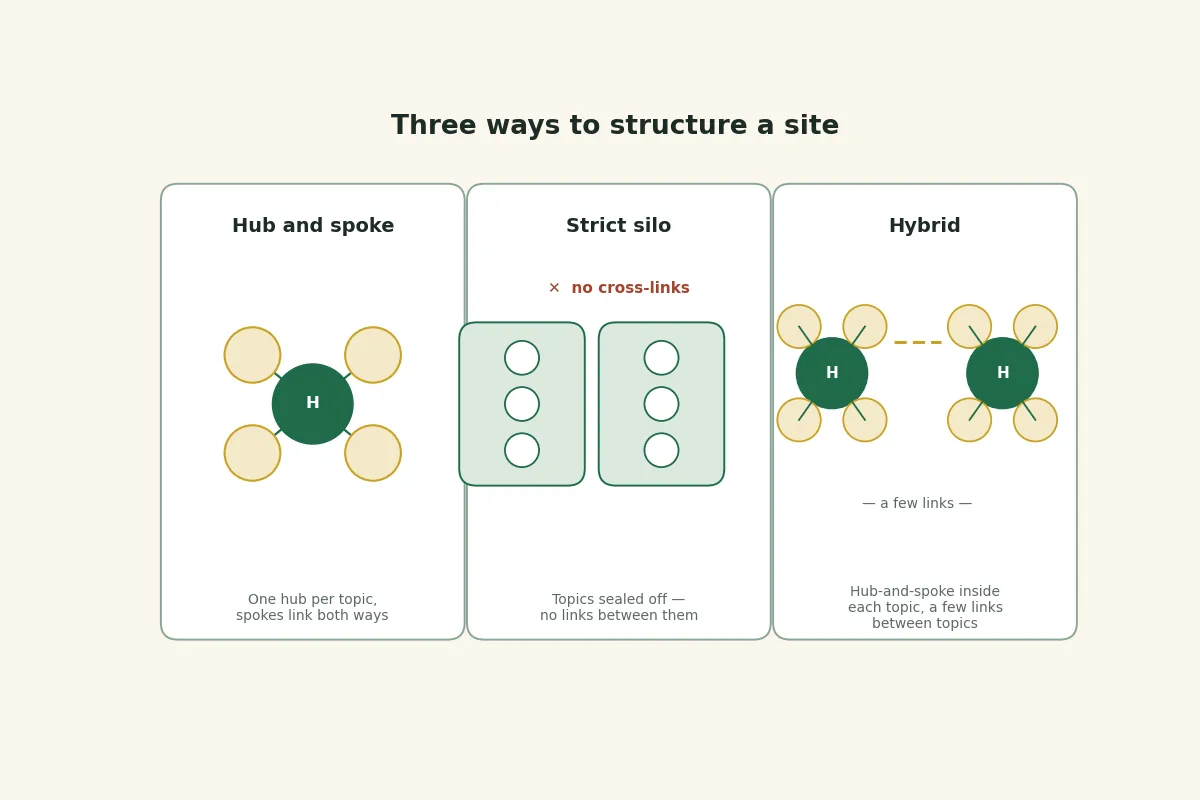
Siloing and hub-and-spoke are often confused, and the difference decides which one to build. A hybrid keeps the hub-and-spoke shape inside each topic but allows a few careful links between topics where a reader would follow them. The table follows SearchDock's comparison: the hybrid wins for most sites, because real topics overlap and a sealed silo fights the reader.
| Structure | How it links | Who it suits |
|---|---|---|
| Hub and spoke | One hub per topic, spokes under it, links both ways | Most small sites with clear topics |
| Strict silo | Topics sealed off; no links between silos | A large site with separate teams per topic |
| Hybrid | Hub-and-spoke per topic, a few links between topics | Most sites past their first cluster |
A hub page is not a list of links with no content of its own. It answers the broad question itself, then points to the spokes for the depth. A hub that is only a list is a directory page, and a directory page is a weaker hub, because it gives a search engine nothing to rank for the broad term.
3. Why the published link counts disagree — and the one rule to use
Ask three guides how many internal links a page should have, and you get three different answers. ScaleGrowth says 5–10 internal links per 2,000 words, roughly one link every 200–300 words. LinkBoss says 30–60 outbound links per page is the sweet spot, and 100 or more is the dilution zone.
NicoDigital says 5–15 contextual links in a well-linked article. Take any one as a rule and you break the other two — and none of the three explains why.
They disagree because they count different things. ScaleGrowth and NicoDigital count contextual links: links inside the body text, placed where a reader would follow them. LinkBoss counts all outbound links, including navigation, footer, sidebar, and related-post widgets.
A page with 8 contextual links and a 40-link menu scores 8 by the first count and 48 by the second — and both numbers describe the same page. The guides measure different things and call the result by the same name.
| Guide | Number | What it counts |
|---|---|---|
| ScaleGrowth | 5–10 per 2,000 words | Contextual body links only |
| LinkBoss | 30–60 per page | All outbound links, navigation included |
| NicoDigital | 5–15 per article | Contextual body links only |
Two more rules keep the count honest. First, the first-link rule: ScaleGrowth notes that Google counts the first link's anchor when a page links twice to one URL, so the first mention should carry the descriptive anchor. Second, there is no magic number: ScaleGrowth quotes John Mueller's point that Google sets no fixed number of links per page, and Google devalues excessive linking — so a count is a guide, not a target to hit with links a reader does not need.
The one decision rule is this: count contextual body links only, aim for 5–10 per 2,000 words, and count navigation separately. A page with 6 contextual links and a full menu is well linked; a page with 40 footer links and no contextual links is not. When you audit a page in section 6, count the links a reader would follow in the text, and ignore the rest — the rest is structure, not linking.
4. The four failure modes on a real site
Most internal-linking problems fall into four modes. NicoDigital names them, and each one has a symptom you can spot and a fix you can apply.
Orphan pages. An orphan is a published page with no internal links pointing to it. The symptom: a page in your sitemap — and in search results, if indexed at all — that no other page mentions.
Crawlers struggle to find it, and it receives no internal authority. The fix is direct: link to it from two or three relevant pages with a descriptive anchor, and check the links appear in the rendered page, not only in the source. A page with one footer link is barely better — give it a contextual link from a page readers visit.
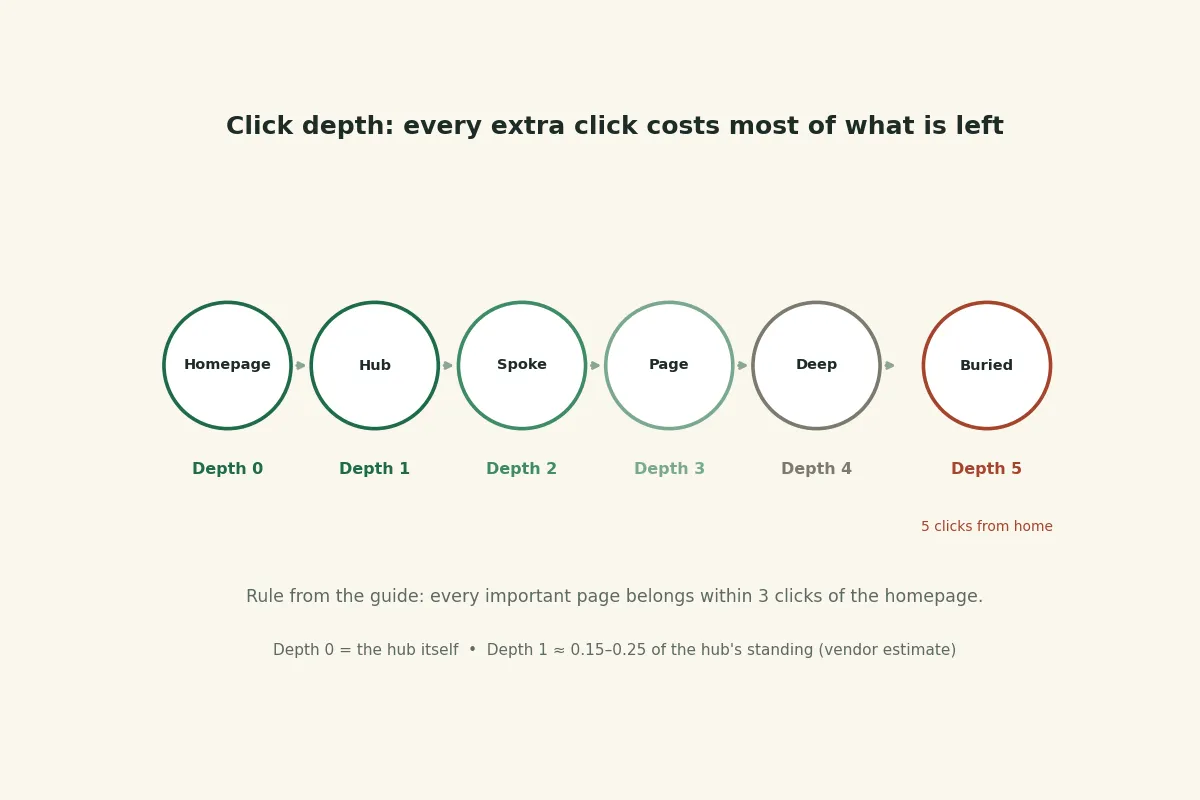
Buried pages. A buried page has links, but they sit too deep: five or six clicks from the homepage, through category pages and archives. The symptom: a page indexed but rarely crawled, that never ranks for its term despite decent content. The fix is to shorten the path: link to it from its hub, and link to that hub from the homepage or the main navigation, so the page sits within three clicks. Every important page belongs within three clicks; deeper pages are crawled less often and treated as less important.
Equity trapped on the wrong pages. Some pages collect links they cannot use. A privacy policy linked from every footer, a thin tag archive linked from every post, a login page in the main menu — each one soaks up internal standing and spends it on a page that should never rank. The symptom: a site whose most-linked pages are its least important ones. Check them in the Links report, and ask whether the top of that list matches your priorities. The fix is to move the equity, not to delete the links: link from your high-traffic pages to the pages that should rank, and let utility pages keep only the links they need.
Weak clustering. Weak clustering is a topic spread across pages that never link to each other. The symptom: three posts on one subject, each written as if the others did not exist, so a search engine sees three thin pages instead of one topic. The fix is to assign one topic per page, pick the strongest page as the hub, and link the cluster together — hub to spokes, spokes to hub, spokes to siblings. A linked cluster reads as one topic; an unlinked one reads as three accidents.
5. The worked example: Veltrix Code's own hub-and-spoke map
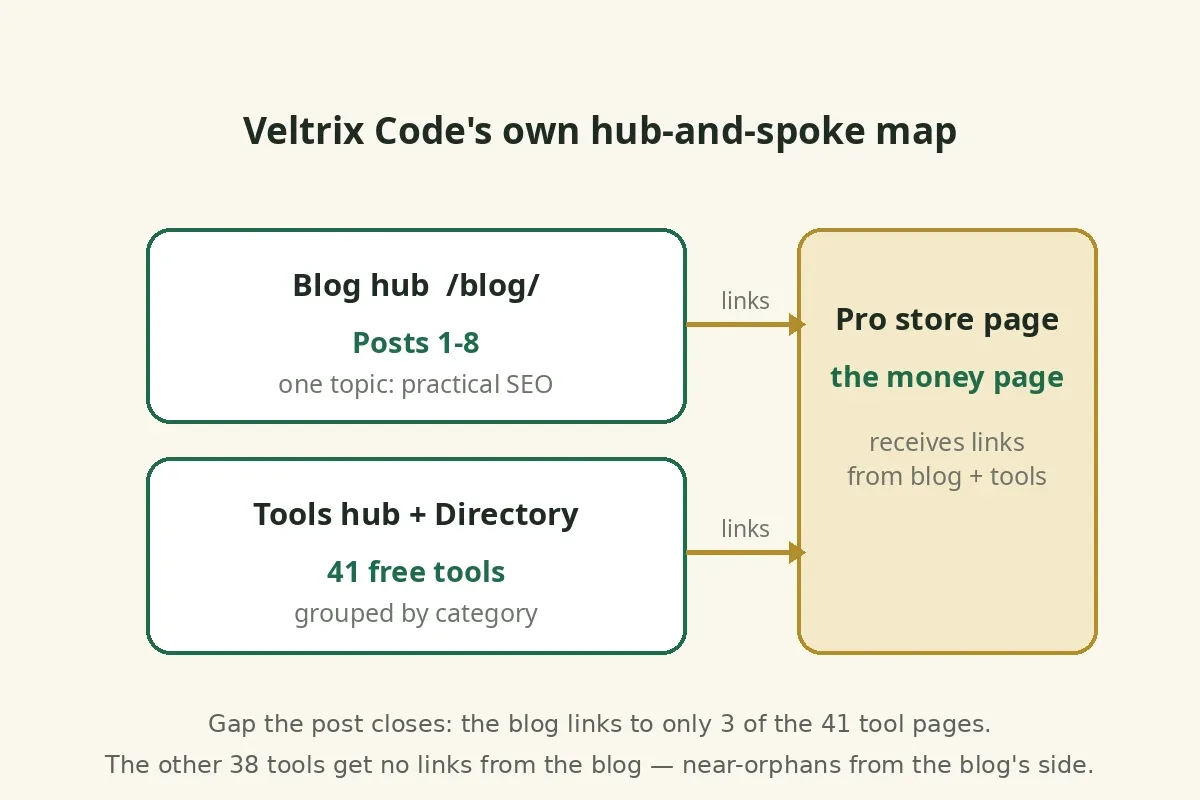
Every guide above uses a generic example. This section uses a real small site — this one — with real pages you can check. Veltrix Code is a small site with a blog, 41 free tools, a directory, and a store. Its structure is a hub-and-spoke map already, and its gaps are the ones this post closes.
The blog is one cluster. Eight posts (Posts 1–8) cover one topic — practical SEO for a small site — and the blog hub at /blog/ is the centre. Each post sits two clicks from the homepage through the hub, and links to the others where the reader would follow: the domain authority guide explains the standing behind the gaps, the backlink gap analysis shows where that standing comes from, and the on-page audit checklist covers the words around the links. This post is the hub for the internal-linking subtopic, and it links to all seven earlier posts.
The tools are the second cluster, and they show the gap most clearly. Forty-one free tools sit as spokes around two hubs: the tools hub at /tools/ and the directory, which lists them by category. But the blog barely points at them.
Across all seven posts as built, the blog links to only three tool pages: the On-Page SEO Content Checker (Posts 1 and 4), the Schema Generator (Post 4), and the EXIF Stripper tool (Post 7, which is built around it). The other 38 tools get no links from the blog. That is the near-orphan problem from the blog's side: the tools are reachable from the hubs, but the blog's readers never meet them.
The store is where the equity has to land. The VeltrixRank Pro store page is the money page: it is the page a reader should reach when a guide has convinced them.
All seven posts link to it, so the blog already passes equity to the store. What has not been checked yet is whether the tool pages do the same — a tool page that never links to the store keeps its own standing and spends none of it. That check is step 3 in section 6.
| Hub | Spokes | Its job |
|---|---|---|
| Blog hub (/blog/) | Posts 1–8 | Answer the broad question and link to every post |
| Tools hub and directory | 41 free tools, grouped by category | List every tool and link to each one |
| Store (Pro page) | The product pages | Receive links from the blog and tools |
Two honest notes close the example. First, hub size: LinkBoss says hub pages run 3,500 words or more. A small site cannot always build a hub that long at the first attempt, and this post is the answer: at about 4,000 words, it is the hub for this cluster.
Start with the hub you can build, grow the spokes first, and expand the hub as the cluster grows — a small hub that links well beats a long hub that links to nothing. Second, orphans: no page here is claimed to be a true orphan, because that claim needs the Search Console Links report, and section 8 runs that check. What is claimed, and checked, is the blog-side gap above — 38 tools with no links from the blog — and that is the first fix pass.
6. Build it step by step
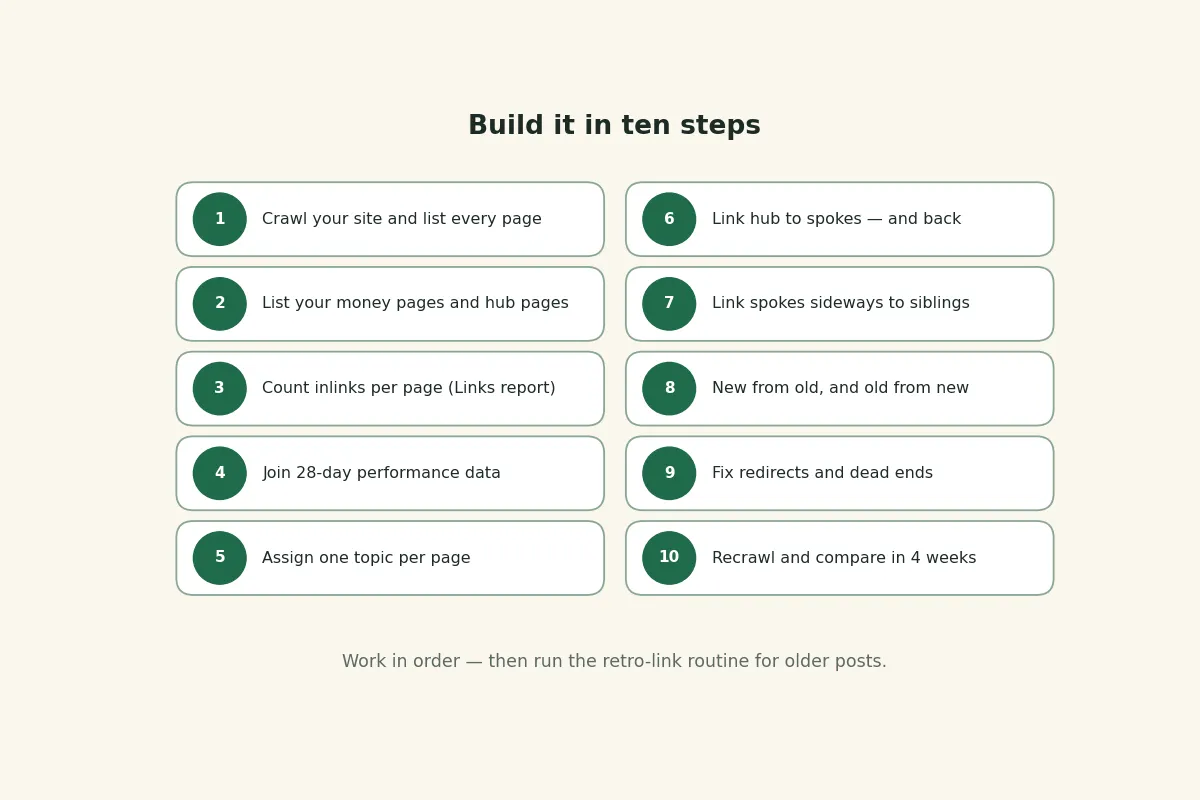
The build below adapts SearchDock's 10-step process to a small site, and adds the retro-link routine this site's seven published posts need. Work it in order.
- Crawl your site and list every page, one per line, with its topic beside it. A small site can do this by hand from its sitemap and navigation.
- List your money pages and hub pages. Money pages earn revenue or sign-ups; hub pages are the broad guides. Here the money page is the Pro store page, and the hubs are the blog hub, the tools hub, and the directory.
- Count inlinks per page in the Links report: Internal links, Top linked pages, exported. Pages with zero inlinks are orphans; pages with one or two are near-orphans.
- Join the performance data: impressions and average position per page for the last 28 days. A page with impressions and no inlinks is one search already shows but your own site ignores.
- Assign one topic per page. When two pages cover the same search, pick the stronger one as the hub and fold the other into it.
- Link hub to spokes and spokes to hub: the hub links to every spoke with a one-line description, and every spoke links back near the top.
- Link spokes sideways to their closest siblings, with a descriptive anchor.
- Link new from old, and old from new: every new page gets links from two or three older related pages on publication day, and links back to them.
- Fix redirects and dead ends: link to the final URL, never to a redirect or a 404.
- Recrawl and compare: ask for a recrawl in URL Inspection, then compare the Links report and performance data four weeks later against the baseline and an untouched control set.
The retro-link routine for this site. This post links to all seven earlier posts, each with a descriptive anchor: the domain authority guide for the standing behind the links, the keyword gap analysis for choosing the searches to win, the backlink gap analysis for where standing comes from, the on-page audit for the words around the links, the 2027 SEO outlook for why the basics matter more, the AEO guide for citations in AI answers, and the EXIF stripper guide for the tool page that already receives blog links. After this post publishes, the second half runs as one edit pass: add a link to this post from each of Posts 1–7, where internal linking is mentioned, and re-check in four weeks. The routine finishes when the older posts point back.
7. Anchor text: descriptive, natural, varied
Anchor text is the clickable words of a link, and it tells a search engine what the destination page is about. Three rules govern it: descriptive, natural, and varied.
Descriptive means the anchor names the destination — a reader who reads only the anchor should know where the link goes. Natural means the sentence comes first and the link follows it, not the other way round. Varied means the same anchor never points at two different URLs, because two pages competing for one anchor split the signal between them.
Aim for 3 to 7 words: ScaleGrowth gives that range, LinkBoss gives 3 to 8, and SearchDock gives 2 to 6 — the guides agree within a word or two. Shorter rarely says enough; longer reads like a pasted heading. The table shows the difference in practice.
| Weak anchor | Better anchor | Why it is better |
|---|---|---|
| Click on this link | The on-page audit checklist | Names the destination |
| This post | The backlink gap analysis | Names the topic, not the format |
| Read more | How to find your keyword gaps | Says what the reader will learn |
| SEO tool | The free EXIF Stripper tool | Names the exact tool |
| Here | The Search Console Links report | Names the exact report |
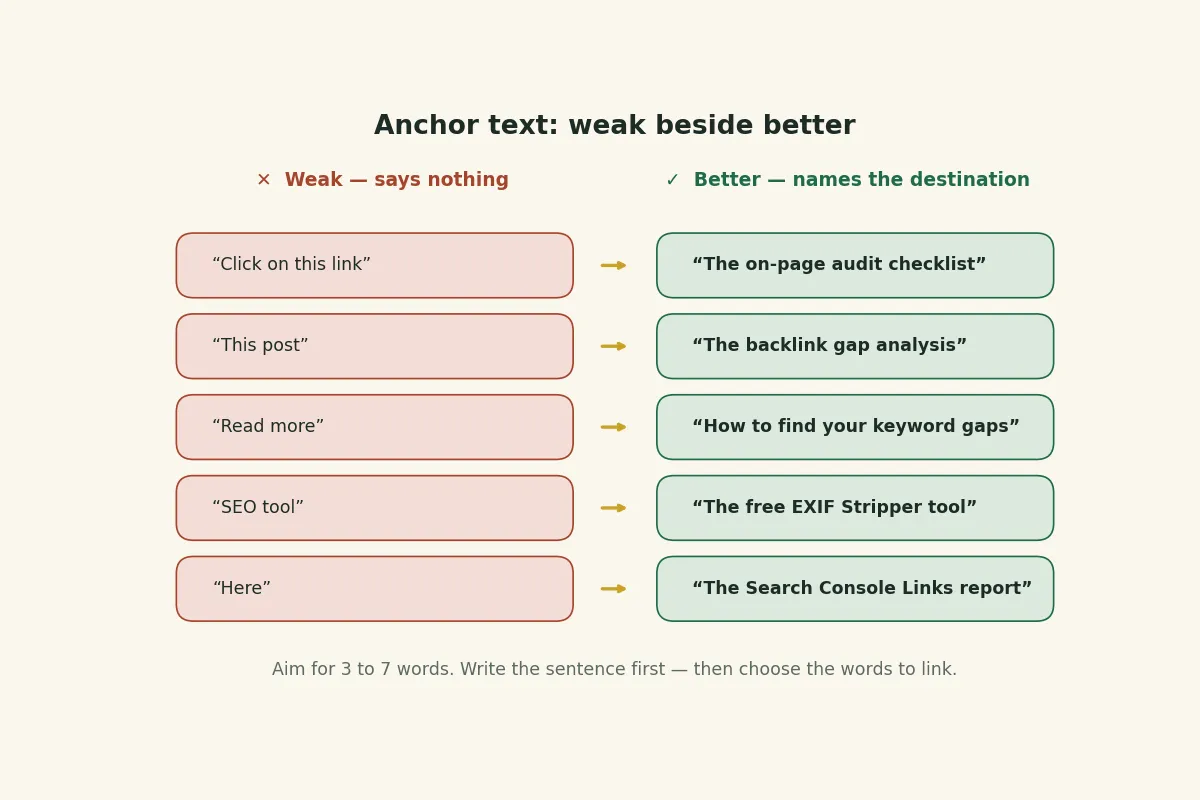
Two habits keep anchors honest. First, write the sentence, then choose the words to link — never write a sentence around a keyword you want to rank for, because the result reads like a label, not a sentence. Second, audit your anchors with your links: the Links report shows top linking text, and if one anchor points at two URLs, or one URL receives five different anchors, the cluster has no clear topic per page. Fix the pages first, then the anchors.
8. Measure it with free tools only
You do not need a paid crawler to measure internal linking. The free routine below uses Search Console, one inspection tool, and counting by hand — and it is honest about what each step cannot prove.
Start with the Search Console Links report: Links in the left menu, then Internal links, then Top linked pages. It lists your pages by how many internal links they receive, and opening one shows which pages link to it. Treat the numbers as a sample: Google's own help page for the Links report says the tables are limited to 1,000 rows, and a page missing from the table is not proof that nothing links to it. Use the report for patterns, not exact counts. No screenshot of the report is shown here — the report lives inside the owner's Search Console account, and this post does not reproduce it.
Then check the recrawl. After you add links, open the changed pages in URL Inspection and ask Google to recrawl them — otherwise the new links sit unread until the next natural crawl. Then count click depth by hand from the homepage. Every important page should sit within three clicks; a page at depth five or six goes on the fix list.
LinkBoss publishes an estimated table of how standing falls with depth. These are the vendor's estimates, not Google data:
| Depth | Share of the hub's standing (estimate) |
|---|---|
| 0 (the hub) | 1.0 — baseline |
| 1 | ~0.15–0.25 |
| 2 | ~0.05–0.10 |
| 3 | ~0.02–0.04 |
| 4+ | Under 0.01 |
Then compare before and after. Record impressions and average position for the changed pages and for an untouched control set over the same four weeks. If the changed pages rise and the control set does not, the links are the likely cause; if both rise together, something else moved. That control set turns measurement into evidence.
The same method works for AI citations, following SearchDock: take the same ten questions, ask each one in ChatGPT, Perplexity, and Gemini before the changes and again after, and compare the averages across runs — never single runs, because one run is a snapshot and the share across runs is the signal. Keep the baseline honest: this site's own 28-day baseline is 3 clicks and 104 impressions. A small site measures from where it actually is, not from where a vendor case study says it should be.
9. Common mistakes
- Linking only new to old. A new post that links to older posts but receives no links back stays undiscovered. Link both ways on publication day.
- Burying money pages. The page that should earn revenue sits four clicks deep while the privacy policy sits in every footer. Check the most-linked list against your priorities.
- Two pages competing for one topic. Two thin pages on one search split the signal. Pick the stronger page, fold the other into it, and redirect the weaker URL.
- Linking to redirects. A link through a redirect arrives late, and a chain arrives later still. Link to the final URL, and fix the redirect.
- Nofollow on internal links. A nofollow tells a crawler not to follow the link — the opposite of what an internal link is for. Save nofollow for links you do not endorse, never for your own pages.
- Huge related-posts widgets. A widget that lists twenty related posts adds twenty links a reader never reads, and dilutes the few that matter. Keep related links to three or four, chosen by hand.
- JavaScript-only links. A link that exists only after JavaScript runs may never be seen by a crawler. Put important links in the rendered HTML.
- Never revisiting links after a change. A page is rewritten, a section is cut, and the links that pointed at it now point at a heading that no longer exists. Re-check links a few weeks after an edit.
Frequently asked questions
How many internal links should a page have? There is no fixed number. Aim for 5–10 contextual links per 2,000 words, count navigation separately, and make every link one a reader would follow or one that passes authority onward.
What is the hub-and-spoke model? A hub page covers a broad topic and links to every spoke page, and each spoke covers one subtopic in depth and links back to the hub and its closest siblings. The hub is the centre; the spokes are its depth.
What is an orphan page? A published page with no internal links pointing to it. Crawlers struggle to find it, it receives no internal authority, and it is usually found through the sitemap alone.
How deep should important pages sit? Within three clicks of the homepage. Deeper pages are crawled less often and treated as less important, so a money page at depth five needs its path shortened.
Do internal links help AI search cite your pages? They improve the odds: shallow, well-linked pages are crawled more often and retrieved more reliably. But no link forces a citation — the page still has to answer clearly.
Where to start this week
Find your orphans first: open the Links report, list the pages with no internal links, and add a contextual link to each one from two or three relevant pages. Then pick your five money pages and check their depth — any page deeper than three clicks gets a link from its hub this week. Then run the same check on your most important page with the 14-tab on-page SEO/AEO auditor in VeltrixRank Pro, with a 3-day free trial and Personal plans from $11/month.
Sources
- ScaleGrowth, "Internal Linking Strategy: The Complete Guide for SEO in 2026" — link-count guideline, hub-and-spoke process, first-link rule, Mueller quote.
- LinkBoss, "Internal Linking Best Practices: The 2026 SEO Standard" — patent grounding, hub and spoke word counts, 30–60 outbound range, click-depth table shown here as vendor estimates only.
- SearchDock, "Internal Linking Strategy: A Practical Guide" — structure comparison table, 10-step process, AI-citation measurement method.
- NicoDigital, "Internal Linking Strategy: A Practical SEO Playbook" — four failure modes, audit-first method, placement hierarchy, per-page workflow.
- Google Search Central, "SEO Starter Guide" — the fundamentals this post follows. https://developers.google.com/search/docs/fundamentals/seo-starter-guide
- Google Search Central, "What Is a Sitemap" — sitemaps as a hint, not a directive. https://developers.google.com/search/docs/crawling-indexing/sitemaps/overview
- Google Search Console Help, "Links report" — 1,000-row limit, sample data, internal links tables. https://support.google.com/webmasters/answer/9049606?hl=en
- Google, Reasonable Surfer patent US 7,716,225 — link weight follows the likelihood a reader follows the link. https://patents.google.com/patent/US7716225
- Google, PageRank patent US 6,285,999 — the node-ranking method the guides cite.
- Veltrix Code Search Console, 28-day baseline at the time of writing: 3 clicks, 104 impressions.
Try it on your own site
The fastest way to start is the first step of section 6: list your pages, count their inlinks in the Links report, and write down the orphans. Then link each orphan from two or three relevant pages, and check the money pages' depth. The work takes an afternoon, and the re-check in four weeks tells you whether it worked.